Search Result For "android"

Could a future Android have a cut-out on top of the screen, too?

Love it or hate it, the iPhone X's notch
may be coming to Android phones.
CNET
Google's next version of Android may be designed for phones that look a lot more like the iPhone X than they do like the Pixel 2 XL.

Android P -- the rumored follow-up to Google's Android Oreo OS -- is said to be optimized for phones with new design types, Bloomberg reported Monday. This includes phones with notches like the iPhone X, multiple screens like the ZTE Axon M and screens that fold like the rumored foldable Samsung Galaxy phone.

Other reported upgrades coming to Android P include longer battery life savings and an even larger role for Google's AI Assistant.

Making Android work with phones that look like the iPhone X is one way to woo iPhone users into switching to Android, according to the report's sources. While Android reportedly dominates the midrange and low-end smartphone market, Apple's iOS controls a large portion of the high-end market. On the flipside, supporting new designs can help satisfied buyers of Android phones remain loyal to the platform.

When the iPhone X was first unveiled, it was mocked for its front-facing camera cutout. However, the Android-based Essential Phone's has one, too, and several other phone makers have mimicked the notch. And as more Android phones are rumored to come with iPhone X-style notches, Google may be working to support them.

iPhone X in photos


This doesn't mean that all phones running Android P will have notches, or multiple screens or displays that fold, but allowing Android to work seamlessly with new designs does make it easier for those that will.

There's also the possibility that Google is building this support into Android P because its next batch of Pixel phones have a notch design, but we won't know until much later in the year. Google's Pixel phones are usually the first to get the new Android OS, and as a result showcase the latest tricks and features.

Google officially reveals the latest version of Android at its I/O developer's conference from May 8 through May 10, so expect to hear more about the OS then.

Google declined to comment on this story.

Watch this:5 new features on Android O

source:CNet

Nope, Android isn’t getting a system-wide dark mode (at least not yet)
According to a number of reports today, the next version of Android would include a “dark mode” — something that’s been a long-time feature request from those who prefer the dark-themed and power-saving option that’s already available in apps like YouTube and Twitter. Unfortunately, that’s not the case.

News that Android was getting its own dark mode emerged from a post by a Google engineer on the company’s Issue Tracker forums, which was then spotted by a Reddit user. (Android Police, The Next Web and others noted this, too.)

The Google engineer had responded on the thread where a user had requested dark mode, saying that “our engineering team has added this feature,” and that “it will be available in a future Android release.”

As you can imagine, this got people pretty excited.

Dark mode has become an increasingly popular theme in a variety of third-party apps, and users have since been clamoring for a way to easily toggle on a dark mode across their operating system entirely. (Some Android devices had supported an automatically applied light and dark theme, based on your wallpaper, but users still want a manual, system-wide setting.)

While that could still be in the works, we suppose, the Google engineer’s comments did not mean to refer to a universal Android dark mode, as it turns out.

Instead, from what we heard and since confirmed, what the engineer was referring to was improved support for dark mode as a feature for developers to implement in their own Android applications. That is, if an app developer wants to build in a dark mode, Google is making that an easier process for them in a future release of Android.

The engineer has also since clarified his remarks, too.

In a new post he writes:
…What we *have* added in a future Android release is a developer-facing setting (via Developer Options) to toggle the -night UI mode qualifier, which will make it easier for developers to create and test apps that implement night mode. This qualifier has been in the platform since Froyo (SDK 8) and globally modifiable via UiModeManager since Marshmallow (SDK 23); however, there was never an explicit toggle made available anywhere in Settings.

If it’s any consolation, we will also not be adding Hot Dog Mode (where all UI elements are yellow and red).
What, no hot dog mode? At least he’s got a sense of humor about the whole thing.

source:TechCrunch

Google Crushes Dreams of a Universal Dark Mode For Android, For Now
Some Android users watching Google’s Issue Tracker board got very excited this week when one of the company’s engineers confirmed that a dedicated dark mode for night browsing would be “available in a future release,” but alas, this was not to be.


Per TechCrunch, instead of the much-desired dark mode feature—which some users insist is easier on the eyes, potentially reduces battery drain, and just looks plain cool—the note apparently referred instead to a developer feature intended to improve dark mode support for third-party app creators. In a post to the Issue Tracker board, the engineer clarified:
What we *have* added in a future Android release is a developer-facing setting (via Developer Options) to toggle the -night UI mode qualifier, which will make it easier for developers to create and test apps that implement night mode. This qualifier has been in the platform since Froyo (SDK 8) and globally modifiable via UiModeManager since Marshmallow (SDK 23); however, there was never an explicit toggle made available anywhere in Settings.
As The Next Web noted, users can simply apply custom-built Android screens to achieve much of the same effect, while numerous apps already have night mode built including Twitter, YouTube, and a few stock internet browsers. Some Android phones already toggle themes depending on the time of day, though it’s not the same as a manual setting that users can apply across the board.

The engineer added that the continued lack of a universal dark mode is at least not because they are wasting time on a “Hot Dog Mode”:
If it’s any consolation, we will also not be adding Hot Dog Mode (where all UI elements are yellow and red).
It’s a shame that dark mode isn’t coming to Android yet, since it’s clearly the best way to run apps even in the daytime (the night mode users will rule this galaxy!). Seeing as it’s pretty easy to replicate most of the mode’s functionality with third-party tools or simply turn on Android’s existing blue light filter (though this ends up looking more like f.lux than what users might expect out of a night mode), this might not the most pressing feature add. Still, one can dream.

source:Gizmodo

Sure enough.

Andy Rubin, the father of the Android operating system, created a new phone last year -- a surprisingly powerful and pocketable handset with no logos to mar its gorgeous titanium and ceramic frame.

And though the Essential Phone was a bit of a flop -- here's our recent re-review -- the company isn't throwing in the towel just yet. On Tuesday, Essential's Twitter account lit up with this teaser:
What could it mean?

Update, Feb. 15: Here's what it means:
Plus, Essential is also rolling out an Oreo 8.1 Beta. So we were right on the money about both.

Original post continues:

Before you get all excited about an Essential Phone 2, you should probably know that there are two much, much less interesting things this teaser is more likely to be about.

Somewhat likely: Android 8.1 Oreo.

The Essential Phone hasn't been updated to Android Oreo yet. There is a giant O in the center of the teaser image, which could stand for Android Oreo. On Jan. 30, Essential tweeted that the release of Oreo would be pushed back "a couple weeks" so the team could release Android 8.1 instead of 8.0. It has now been a couple weeks.

More likely: A new aqua-colored version of the Essential Phone.

The Essential Phone originally came in black, with white, shiny dark grey and an aqua version with a gold-colored rim promised for later. That aqua-and-gold version was known as Ocean Depths, and had a gold ring around its fingerprint sensor too.

Essential's gorgeous teal phone goes on sale today
Screenshot by Sean Hollister/CNET
Essential's teaser image has a gold ring on an aqua background.

Also, "a new wave is coming" seems like a pretty obvious pun. And with that, my detective work for the day is done.

According to market research firm IDC, the Essential Phone shipped fewer than 90,000 devices in 2017. That's tiny even compared to the 3.9 million Pixel phones that Google shipped last year, and a drop in the ocean compared to the 70+ million phones that Apple and Samsung each shipped last quarter alone.

Essential declined to comment.

source:CNet

How to Avoid Being Tracked on Your Laptop, Phone, or Fitness Tracker
Today we’re all being tracked by more gadgets than ever before, and in ways that might not be immediately obvious; but it is possible to put restrictions on the data that your laptop, your smartphone, and even your fitness tracker can collect about you—in particular, where you are and what you’re doing with your device.

As you’ll be able to tell if you actually read through any of the privacy policiesthat appear when you sign up for a new website, install a new app, or boot up a new device, it’s just about impossible to stay completely untracked unless you’re going to retreat to an off-the-grid cabin in the woods to see out your final days.

That said, there are steps you can take to at least limit some of the data that developers, tech companies, websites, and advertisers are amassing on you. Here are the key settings you need to know about for your laptop, your phone, and your fitness tracker.

Laptop data

Log into a macOS computer and you’re making a deal with Apple as per its privacy policy about what it can and can’t track. There’s also the applications you install on top, and the websites you visit, which will have data logging policies of their own to think about—it’s something to consider every time you install something new.

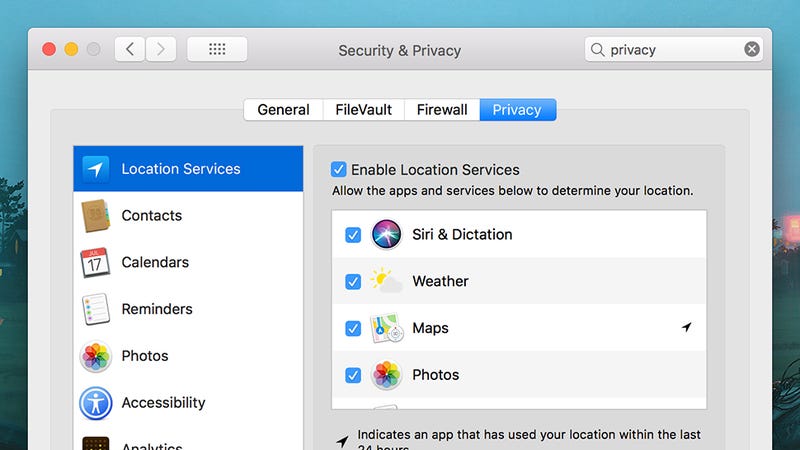
You can put certain limits on data collection—from the Apple menu choose System Preferences then Security & Privacy. Under the Privacy tab are options for preventing apps and macOS itself from tracking your location, as well as settings for which programs can see your contacts, calendars, and so on. Select Analytics and you can choose which diagnostic data gets sent back to Apple—data which the company promises is anonymized.
How to Avoid Being Tracked on Your Laptop, Phone, or Fitness Tracker
Image: Screenshot
Those of you using Windows can take a look at Microsoft’s privacy policy if you want to know what’s being collected and why—your wedding anniversary, maybe, so Cortana can remind you about it. As on macOS, you also need to consult the policies and setting pages for all the applications you install if you want to get a genuinely comprehensive picture of the data you’re giving away.

Fire up Settings in Windows 10 (the cog icon on the Start menu), click Privacy, and you can disable tracking settings related to app launches, access to the camera and the microphone by certain apps, and location tracking. You can, for example, limit the apps that have access to your precise location, as well as turn location tracking off for your whole laptop.
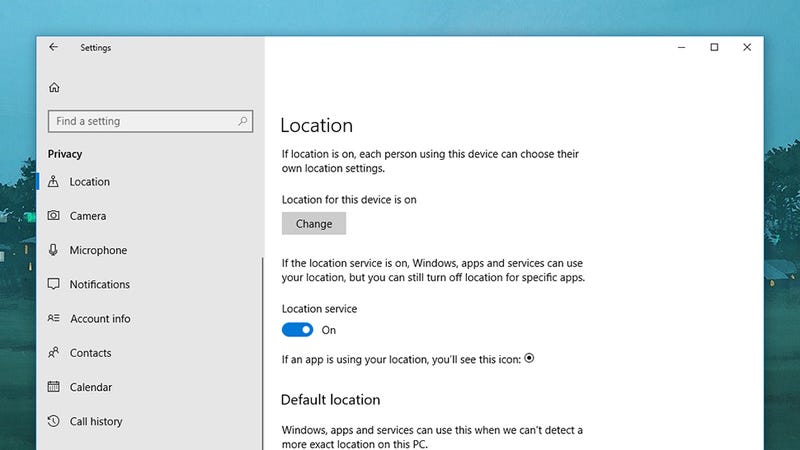
Killing location tracking on Windows
Killing location tracking on Windows.
Image: Screenshot
If you’re on a Chromebook then you’ll want to check out Google’s privacy policy to see the data that it’s collecting—which is a lot. Some of this is an inevitable consequence of choosing to use Chrome OS or indeed Chrome on macOS or Windows, but the best place to manage data logging is your Google account page on the web.

Click Go to My Activity to see data being tracked across Chrome, Google search, YouTube, Google Maps and more, and to delete it if necessary. To turn off some of this data collection—like location logging—select Manage your Google activity from the front page, then Go to Activity Controls. This data covers information collected by Google for its own purposes, rather than any data made public.

A big part of the data you’re giving away is to websites you visit, which are keen to track you to the greatest extent possible. We’ve previously written detailed guides to all the data sites collect as well as ways in which you can stop it from happening. For example, you can turn off cookie tracking in your browser’s settings if you don’t want sites to recognize you when you return.

Installing a VPN is one of the best ways of obfuscating your location from the sites you visit, the applications you use, and your ISP. It also encrypts data sent between you and the web, though it doesn’t necessarily do much to stop data tracking on the web. Sites will still be able to recognize you—especially if you log in—unless you take steps to restrict this in your browser settings. If you want to really avoid being tracked on a browser and don’t mind never signing into an account again, than you can always use a TOR browser.

Phone data

As on desktop OSes, you make certain deals with Apple and Google when you sign into your accounts on a brand new phone—if you don’t like it, don’t use iOS or Android. However, there are certain settings you can get at to restrict how much data you’re giving away on your smartphone, both to Apple and Google and the apps you’ve installed.

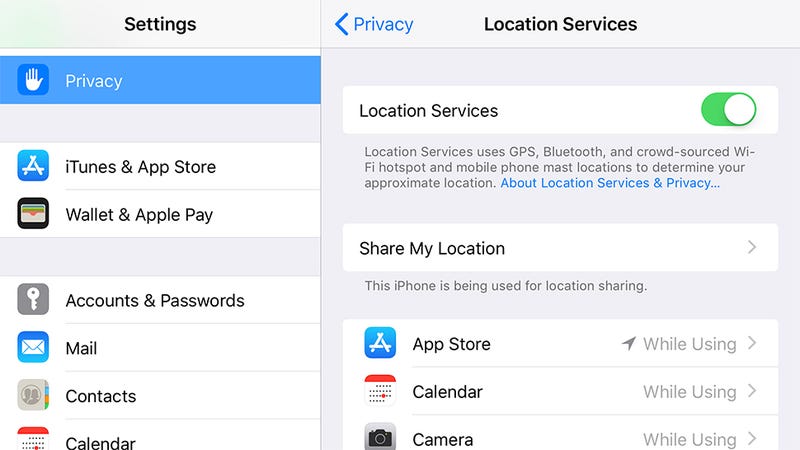
In the case of iOS, you can find a dedicated Privacy menu entry in Settings. Open this then tap Analytics to see the data you’re sending back to Apple—this includes data on how you use your phone, how you use iCloud, and the fitness tracking data logged by your phone’s sensors. None of this information identifies you personally, Apple promises.
How to Avoid Being Tracked on Your Laptop, Phone, or Fitness Tracker
Image: Screenshot
You can actually see the data being logged if you tap Analytics Data. In the words of Apple: “Personal data is either not logged at all, is subject to privacy preserving techniques such as differential privacy, or is removed from any reports before they’re sent to Apple.” If you’re not happy with any of this, turn the toggle switches to off next to Share iPhone Analytics, Share iCloud Analytics, and Improve Health & Activity.

Head back to the Privacy menu and you’ve got all the key permissions being used by your apps, both Apple’s and those from third-party developers—tap any of these entries, like Health, to revoke permissions. In the case of Location Services, you can either turn your phone’s location tracking off completely, or on an app-by-app basis, which is great for your privacy but not so great for finding local coffee shops.

Over on Android, you can check up on what Google is keeping tabs on by launching Settings then choosing Google and Personal info & privacy. The key option on the subsequent screen is Activity controls, where you can choose the data that Google logs, from your voice searches to your location—it’s up to you to what extent you trust Google to use this data in a responsible way.

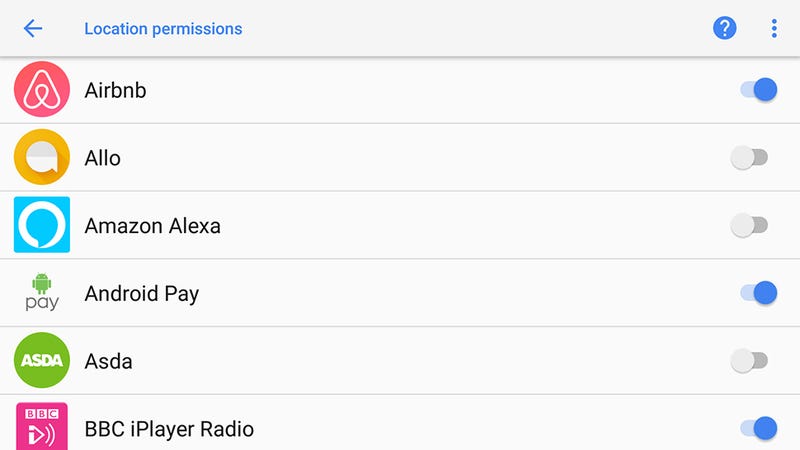
Then there are all the individual tracking permissions assigned to your apps, which on Android can be found by tapping Apps & notifications then App permissions. As on iOS, the items listed here are the various bits of data apps can request access to, from your current location to the phone microphone.
How to Avoid Being Tracked on Your Laptop, Phone, or Fitness Tracker
Image: Screenshot
Tap any of the items on the list to see which apps have access and revoke that access if necessary—just slide the toggle switch to the off position. You can also choose an app from the Apps & notifications screen, then select Permissions to see what it has access to and revoke the access if you want to (which may or may not break some of the functionality of the app along the way).

With any iOS or Android app, having access to something like the microphone doesn’t necessarily mean the app is recording everything you say. Even if it is (maybe it’s a dictation app), it doesn’t necessarily mean the developer is using it for a nefarious purpose. But you’re really at the mercy of the developers, their privacy policies, and how well they stick to them—the safest option is just to turn off permissions.

Fitness tracker data

When you buy and set up a new fitness tracker, you’ve got two concerns: The data the tracker manufacturer is collecting, and the data being collected by any apps you’ve set up to work with the tracker. As always, a thorough read through of the associated privacy policies is recommended, if you can make sense of them.

In the case of individual apps, such as Strava or Fitbit’s bundled app, you can make use of the various permission switches we’ve already mentioned that are built into iOS and Android. However, they refer specifically to the data being collected from your phone, and won’t necessarily cover data being synced from a separate wearable.
How to Avoid Being Tracked on Your Laptop, Phone, or Fitness Tracker
Image: Screenshot
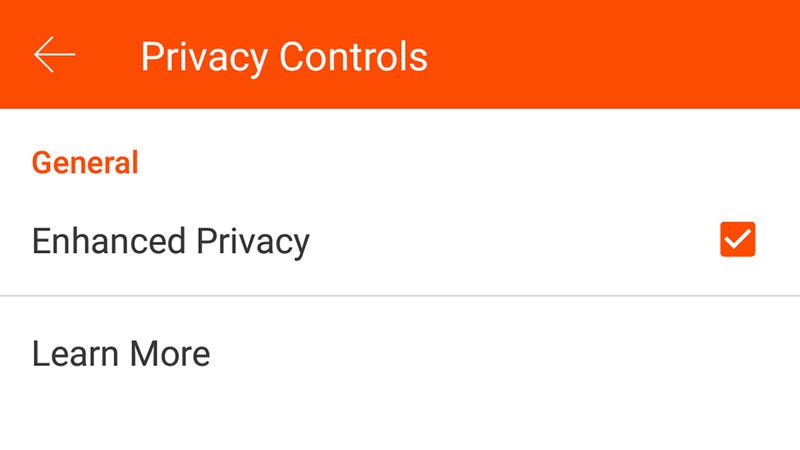
To really take control over the data being logged and shared by your fitness apps, you need to delve into the settings for those apps. In the case of Strava, for example, tap the Menu button (top left on Android) or the More button (bottom right on iOS), choose Settings and then Privacy Controls, and you can hide your activities from other users.

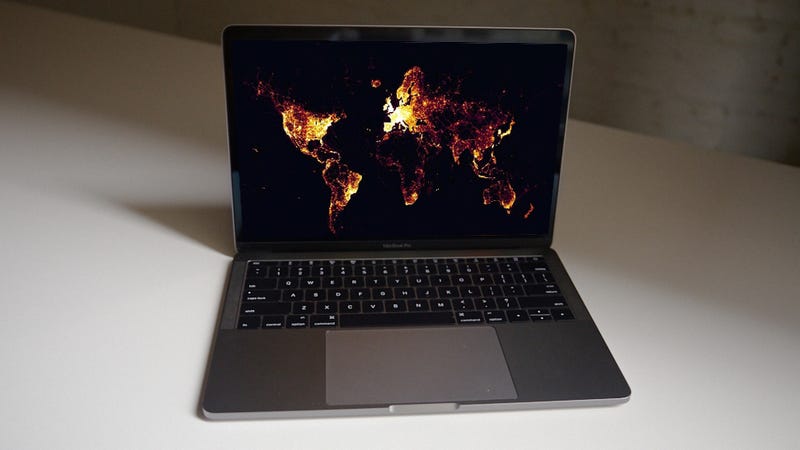
You can also hide individual activities from view, and extra privacy settings are available on the website, including the specific option to exclude you from heat maps, and the option to create privacy zones. These are certain areas of the planet where your activities can’t be viewed by anyone you’ve connected with or anyone browsing your Strava profile.

Of course this only hides your runs and cycles from other people, not from Strava itself—though the company says private activities weren’t shown on the now infamous heat map. As we’ve mentioned above, signing up with these services essentially means you’re giving them permission to log and use your data as defined by their privacy policies (here’s Strava’s), which are usually fairly ambiguously worded.
How to Avoid Being Tracked on Your Laptop, Phone, or Fitness Tracker
Image: Screenshot
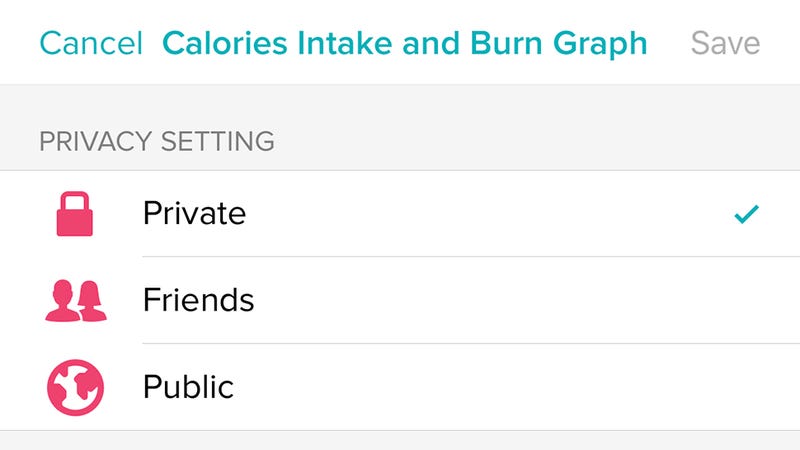
Your own fitness tracker and apps may vary. With Fitbit’s apps, tap the profile icon to the top right, then your account name, then Personal Stats—similar options are available on the Fitbit website via the cog icon (top right)—then Settings, then Privacy. The subsequent screens let you control the data that’s shown on your Fitbit profile and made visible to your Fitbit friends, or indeed the world at large.

So click or tap on any bit of data, such as Average Daily Step Count or Sleep Graph, and you can set its visibility to Public, Friends, or Private. As with Strava though, this is only limiting what other people can see—Fitbit is still collecting all of this information, as it’s the way that its apps work.

Obviously Strava, Fitbit, and others need to collect and log data on you—it’s how the whole fitness tracker experience works, so you can see just how much faster your morning jog is getting. You can limit some of the ways this data is used, depending on the app, but getting out altogether usually means deleting your account and uninstalling the app.

source:Gizmodo

Facebook-owned Onavo quietly launches Bolt App Lock, a data-tracking app that locks other apps
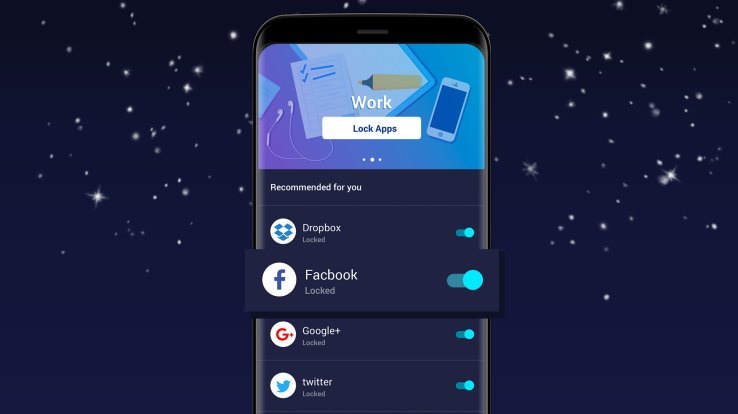
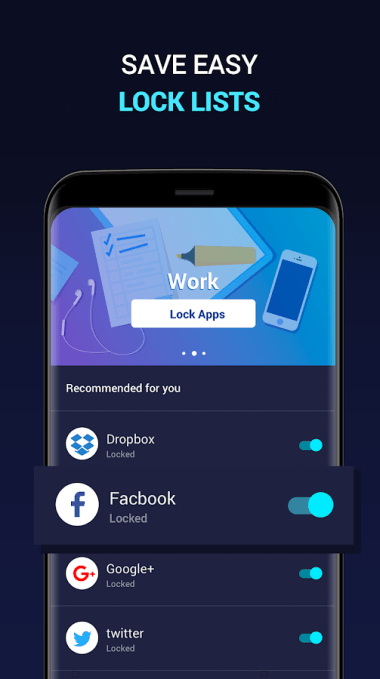
Onavo, the data-security app maker Facebook acquired in 2013 in order gain insights into mobile user activity across apps, has quietly launched a new app aimed at Android users called Bolt App Lock. Instead of offering a VPN, Bolt App Lock is a tool that lets you lock down any app you don’t want others to be able to open, using a PIN code, pattern, or your fingerprint.

Apps that help users lock other apps is a popular category on Android, where you can today find dozens of similar solutions – though largely from unknown companies save for a few, like Keepsafe or Norton, for example. Like the others in this space, the Bolt app lets you lock down other apps that contain personal information, such as private photos or payment details.

Facebook-owned Onavo quietly launches Bolt App Lock, a data-tracking app that locks other apps
With the resources of Facebook behind it, Onavo appears to have built a more polished, modern alternative to the existing apps.

But Onavo – and Facebook’s – primary interest isn’t on personal security. It’s about finding a way on users’ phones in order to monitor mobile activity and learn what new apps could be taking attention away from Facebook’s social network.

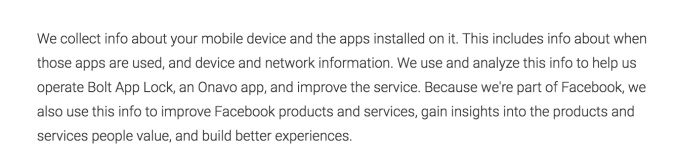
This is disclosed at the bottom of the app’s listing on Google Play, which explains that, as a Facebook company, Onavo will “collect info about your mobile device and the apps installed on it” and share that with Facebook.

Bolt App Lock’s disclosure regarding data collection
Above: Bolt App Lock’s disclosure regarding data collection
Data on mobile app usage has helped Facebook better compete with rivals like Snapchat – like when it saw how Instagram’s launch of a Stories-like feature was working to slow down Snapchat’s user growth, for instance. It also likely helped to inform Facebook’s newer acquisition of the buzzy teen compliment app tbh, which soon led to a new Facebook Q&A feature, inspired by tbh.

To attract users to its Onavo VPN, Facebook recently began advertising the app directly within Facebook’s main navigation on iOS, under the menu item “Protect.” When clicked, the link would take you to the download page for Onavo Protect on the App Store. The company has also featured a similar “Protect” link in its Facebook app for Android in the past. (We’re not currently seeing the option on Android, but your mileage may vary as Facebook’s apps are continually being tweaked and updated.)

But in order to gain these sorts of insights, Facebook needs a user base willing to install Onavo’s app. That may be more difficult to achieve these days, though.

After TechCrunch broke the news of Onavo’s appearance on iOS, a number of outlets directly warned users not to install the app. (See, for example: Gizmodo’s “Do Not, I Repeat, Do Not Download Onavo, Facebook’s Vampiric VPN Service” or Wired’s “Don’t trust the VPN Facebook wants you to use.”)

Until the backlash over Onavo Protect dies down, a new app like Bolt App Lock could give Facebook a different means of expanding Onavo’s user base, and therefore, Facebook’s access to mobile user data.

The app also hasn’t made an appearance in Facebook’s app, the way Onavo Protect did – at least not as of yet. We asked Facebook if that’s the eventual plan, but haven’t heard back.

Bolt App Lock launched on March 5, 2018, according to data from Sensor Tower. It’s not yet showing on the Onavo homepage as one of the company’s products. The app is a free download on Google Play.

source:TechCrunch

Apple and Android are destroying the Swiss Watch industry
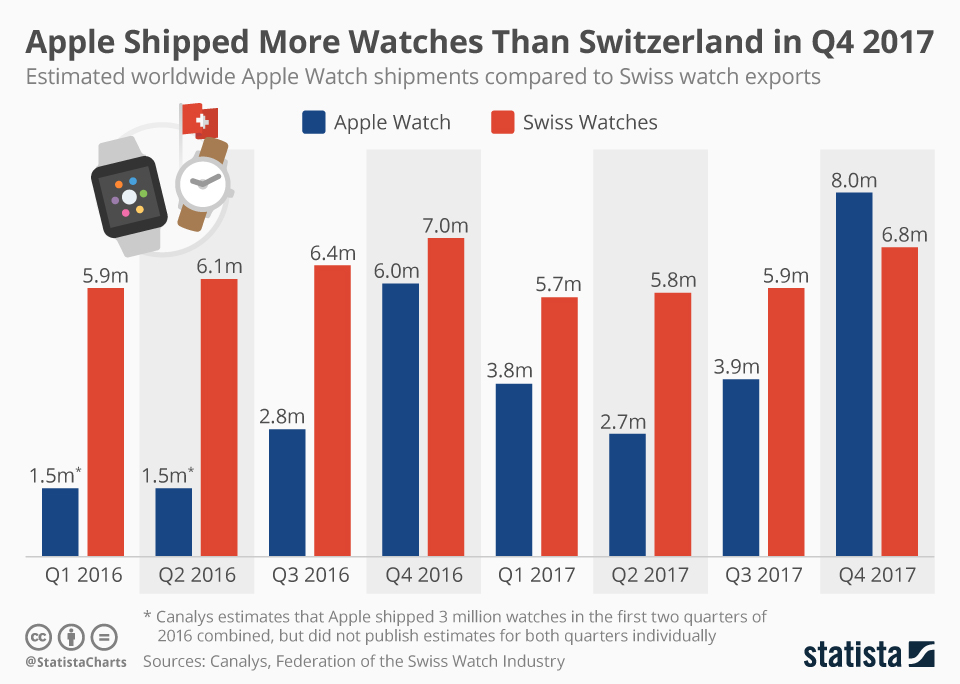
In Q4 2017 – essentially during the last holiday season – market research firm Canalysfound that more people bought Apple watches than Swiss watches. Two million more, to be exact. Brian Heater has more data but this news is quite problematic for the folks eating Coquilles St-Jacques on the slopes of the Jura mountains.

The numbers are estimates based on market data but they still point to a trend. In Q1 2016 Apple shipped 1.5 million watches to Switzerland’s 5.9 million. The intervening quarters were about the same until the launch of the Apple Watch 3 in September 2017, just in time for holiday shopping. The boost of a new phone and a new watch at the same time meant a perfect storm for upgraders, driving the total number of Apple Watches sold past the Swiss watch sales numbers.

Apple and Android are destroying the Swiss Watch industry
Image: TechCrunch
This switch does not mean Apple will maintain that lead – they have one product while Switzerland has thousands – but comparing a single company’s output to an entire industry’s in this case is telling.

Wearing watches is, as we all remind each other, is passé.

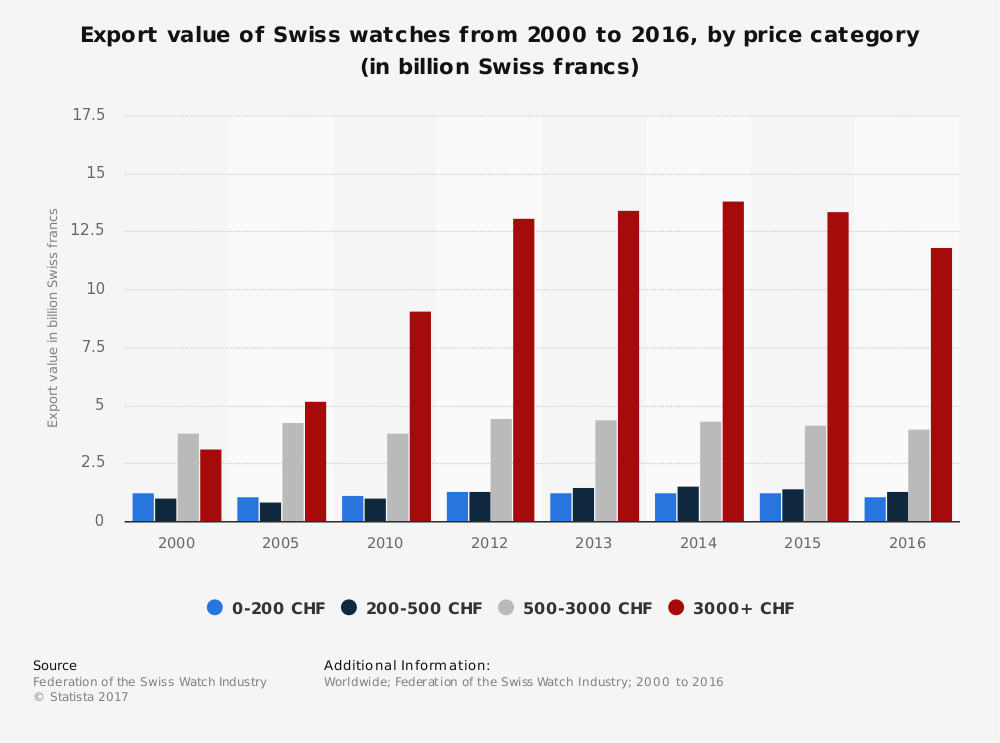
“I check the time on my phone,” we said for almost a decade as phones became more ubiquitous. Meanwhile watch manufacturers abandoned the low end and began selling to the high end consumer, the connoisseur.

Take a look at this chart:

Apple and Android are destroying the Swiss Watch industry
Image: TechCrunch
Sales of low- to mid-tier watches – and a mid-tier watch can range in price between $500 and $3,000 (and I would even lump many $10,000 watches in the mid-tier category) – were stagnant while the true cash cows, the expensive watches for the ultra-rich, fell slowly from a high in 2014. This coincides with falling purchases in China as what amounted to sumptuary laws reduced the number of expensive gifts given to corrupt officials. Sales are up as December 2017 but don’t expect much of a bump past the current slide.

As a lover of all things mechanical – I did ruin a few years of my life writing a book about a watch – I look at these trends with dismay and a bit of Schadenfreude. As I’ve said again and again the Swiss Watch industry brought this on itself. While they claim great numbers and great success year after year the small manufacturers are eating each other up while nearly every major watch brand is snooping around for outside buyers. There is no money in churning out mechanical timepieces to an increasingly disinterested public.

As time ticks ever forward things will change. The once mighty Swiss houses will sink under the weight of their accreted laurel-resting and Apple will move on to embedded brain implants and leave watches behind. The result, after a battle that raged for more than four decades, will be a dead Swiss industry catering to a world that has moved on.

source:TechCrunch

Alto's Odyssey comes with a special photo mode that lets you line up shots like this from the pause menu

Snowman's sequel to the already amazing Alto's Adventure from 2015 has finally arrived, and new tricks, new scenery and an amazing soundtrack make it worth the wait.

After delays pushed the final release of Alto's Odyssey well past its planned summer 2017 launch date, the iOS game hit Wednesday, proving that developer Snowman's decision to take time to make it just right was a smart move. This is an excellent sequel.

Alto's Odyssey is worthy of its critically acclaimed predecessor, with enough additions and changes to the original formula to keep the game fresh. The beautiful scenery and weather effects you remember from Alto's Adventureare even more streamlined in the sequel, with new environments such as dunes, canyons and ancient temples.

When you see a cliff face with a dot grid, just tap when you get there to start wall riding
When you see a cliff face with a dot grid, just tap when you get there to start wall riding.
Screenshot by Jason Parker/CNET
The one-touch control system that made the original so elegant is still here, but with a major improvement. Instead of just tapping to jump and do backflips, you can now use wall rides that make pulling off longer trick combos much easier. Alto's Adventure already let you do combos of tricks, but you didn't really have control over them.

With the new mechanic, you can grind a line of flags, go to a wall ride, do another grind on a roof, then backflip to a landing. In other words, it's one more trick option in your arsenal that gives you more ways to combo.

As with the original, you'll be able to buy items for in-game currency that will boost certain skills, but the advantages are temporary. Also like the original, you'll be able to unlock six additional characters as you play, each with its own set of skills and abilities. Pay-to-win elements aren't evident yet, and Snowman says in its game description: "Alto's Odyssey is a premium game with no ads or in-app purchases. Purchase once, play forever."

The game costs $4.99 (£4.99, AU$7.99).

When you don't want to worry about scores or coins, try the game's Zen Mode for a relaxing ride
When you don't want to worry about scores or coins, try the game's Zen Mode for a relaxing ride.
Screenshot by Jason Parker/CNET
When you just want to take in the scenery and music of the game, you can switch to Zen Mode, which has its own relaxing soundtrack and no coins or power-ups to collect. Instead, you just speed down the hills and take in the game's sights and sounds.

People were disappointed last summer when Alto's Odyssey was delayed with no release date in sight, but Alto's Odyssey has proven worth the wait.

As for an Android version, Snowman says to stay tuned.

"As a small team we have to prioritize one platform for launch, but we haven't forgotten about our Android players," said spokesman Ryan Cash. "We aren't committing to a release date and don't have any pricing details at the moment, but we will definitely be bringing Alto's Odyssey to Android."

source:CNet

Google needs to give the AirPods better competition
In the race for in-ear AI, Apple has the clear advantage despite the fact that their intelligent assistant is one of the dumbest of the bunch.

Yesterday, reports emerged that Apple was working on a pair of follow-ups to its Airpods headphones that could bring them always-on Siri functionality as well as a splash-proof design. As we think about all the things that Apple could do right with its next set of wireless earbuds, it’s easy to reflect on all that Google did wrong with its Pixel Buds and how much of an opportunity they still have.

Google Assistant lends so much potential to a pair of smart wireless earbuds from Google. The fact is that Siri doesn’t hold a candle to Google Assistant in many ways, and while the functionality of voice control on the AirPods is largely focused on music and calls, the superior intelligence of Google Assistant should make them a much clearer companion for a set of earbuds.

Hardware is still very much a side project for Google, but as the company prioritizes home assistant hardware, it really doesn’t make sense that they’re not putting more resources into a pair of wireless headphones. The Pixel Buds need a more purposeful design that minimizes friction and delivers Assistant insights more effortlessly in a package that feels like more than just a follow-on.

Google needs to give the AirPods better competition
The AirPods are an engineering marvel, and while some of the functionality of the Pixel Buds was interesting — mainly their ability to interface with the Pixel 2 for language translation — they fell flat on design. Google needs to rethink its wireless earbuds from the ground-up and focus more on creating something with the sleekness of the Pixel phones rather than the fabric-obsessed friendliness of their Home devices. Cutting the woven cord and moving to a truly wireless form factor is a necessary step, as is shrinking down the size of the Bud part of the product. It’s really not about the sound quality as much as it is about the connectivity and the lack of friction. While FastPair has been a great step in simplifying the bluetooth pairing, there are still some quirks that aren’t present with Apple’s W1 chip.

While Siri is always quick to refer you to search results when it doesn’t have an answer (a frequent occurrence), Assistant’s optimization for its display-free Home devices has led it to order functionality around the assumption that there’s not always a screen available to default to. Today, Google announced that it was bringing location-based notifications and voice-optimized routine functionality to its Home devices so it could complete regular custom tasks without you having to pepper it with commands, stuff like this would be ideal for earbuds that are always-listening, something that Google could do much more with than Apple.

Even as features take months to roll out, Google has still shown a degree of nimbleness on the voice assistant front that Apple can’t match in annual WWDC keynotes. While Amazon is just as quick with Alexa, Google Assistant’s deepening integration with Android establishes an arena where they should be the clear champion.

AirPods are clearly the best wireless earbud that an Apple user can own and even with the reduced functionality that still might be true of Android phones. People are building tools to bring iOS-only feature sets to Android and that fact alone should suggest Google take a more serious look at its own hardware and the opportunity that it’s losing out on.

source:TechCrunch

Samsung saves Opera Max browser app from the deadpool
Opera Max lives on after Samsung acquired the mobile browser to save it from oblivion.

The browser was one of the first data-friendly mobile browsers and it later added privacy-focused settings, including safeguards against insecure WiFi connections and a VPN. The popular app clocked up more than 500,000 installs, but that didn’t stop parent company Opera — which is owned by a consortium of Chinese firms — from announcing its closurelast year.

“Opera has now decided to discontinue Opera Max. The product had a substantially different value proposition than our browser products, and represented a different focus for Opera,” it wrote at the time. “We, therefore, focus on our browsers and other upcoming services.”

Step forward Samsung, which said today that it has picked up the service and turned it into ‘Samsung Max’ — as first spotted by VentureBeat.

Samsung saves Opera Max browser app from the deadpool
Screenshots of Samsung Max for Android
Opera Max users will get an update that brings them over to the now-Samsung-owned version, while other users can get their hands on the Android app or check the Galaxy Apps store. Bad news though, it’ll only be available on Samsung phones rather than all Android devices as had previously been the case.

In addition, Samsung plans to preload the app on its devices in a number of emerging markets: Argentina, Brazil, Indonesia, Mexico, Nigeria, South Africa, Thailand and Vietnam. It’s unclear how much Samsung paid for the service, if anything at all, but you’d imagine it wasn’t a lot since it was destined for closure.

source:TechCrunch

A Google Chrome lapel pin
A technology twist could make mobile browsing faster and more engaging, and Google's putting muscle behind it.

The web has taken a beating in the smartphone era. But it's about to start beating back.

Explosive growth of the web, starting in the 1990s, connected the world's population. In the last decade, though, we all started tapping app icons instead of web hyperlinks to chat with friends, share photos and buy products online.

Now Google's Chrome team and browser allies from Mozilla, Opera and Microsoft are putting a new twist on things. It's called progressive web apps, or PWAs. They endow websites with many of the advantages of native apps that run on Google's Android or Apple's iOS. And they can outdo native apps when it comes to fast, hassle-free loading.

PWAs are headlining this week at the Chrome Dev Summit, Google's two-day conference in San Francisco for programmers who want to figure out where Google is taking browser technology. Native apps hog the spotlight, but at the conference, Google will reveal a good reason why browsers generally and Chrome in particular also deserve a place on the stage: unbeatable reach.

"We have over 2 billion Chrome instances that are active" each month, said Darin Fisher, Google's vice president of Chrome engineering and the conference's opening speaker. That amounts to fewer than 2 billion people, because a single person can use Chrome on multiple devices, but it's still a platform with immense power.

That power is essential to making Google's vision a reality. If it succeeds, that browser icon might be the one you reach for on your home screen a lot more often.

Website usage tracking firm StatCounter says browser use on mobile devices just exceeded PC browsing worldwide
Website usage tracking firm StatCounter says browser use on mobile devices just exceeded PC browsing worldwide.
StatCounter
Success on that front also could help restore the fortunes of the web, the closest the computing industry has come to freeing us from software that works only on one device or another, like a Windows laptop but not an iPhone. In an era when tech giants wield tremendous power, the web levels the playing field and makes it easier for new competitors to join the game.

It's no wonder Google is pushing the mobile web. This month, browser usage on tablets and phones for the first time surpassed usage on PCs, analytics firm StatCounter said.

App fatigue

Apps might get the glory, but the web does a lot of the work already. When we need to interact with a business or service, a website is often our first point of contact. Apps are popular, with millions available in Apple and Google app stores, but it's hard to convince people to install them, and even then, most lie dormant.

Among American adults, "almost half...report that they use five or fewer apps at least once per week, and just 16 percent indicate that they use more than 10 apps on a regular basis," a 2016 Pew Research Center study found. And Localytics, which monitors app usage, found that 23 percent of users never reopen an app after the first time and that only about a fifth of people are likely to still use an app after three months.

Darin Fisher, vice president of Chrome engineering, speaks at Google's Chrome Dev Summit
Darin Fisher, vice president of Chrome engineering, speaks at Google's Chrome Dev Summit.
Stephen Shankland/CNET
Fisher isn't pronouncing native apps dead, but he thinks PWAs means the web can shoulder more of the load.

"It's expensive to get people to install an app," Fisher said, but progressive web apps arrive fast through the browser to keep visitors happy, then download extra abilities silently in the background. For website developers, he said, "there's really no fundamental limit to the kinds of experiences you can create."
There's a place for both apps and websites, analyst firm Gartner believes. "A mobile website is more generic, with wider reach, like your ABC or CBS or Fox or NBC channels," said Research Director Jason Wong, while native apps are akin to "a cable channel like the Cooking Channel or MTV targeted toward a specific segment." Apps are great for people who use a company's services are lot, like the 10 percent or 15 percent of users who come back to an e-commerce site frequently, but websites are crucial for the rest.

"The mobile web is unavoidable. Users are using smartphones and tablets to access websites more and more. Google has changed its [search] algorithm to reward mobile-optimized websites," Wong said. "It's imperative companies move to responsive and mobile-optimized websites."

Progressive web what?

If you're browsing the web, you won't see any fancy label announcing a progressive web app. But done well, you'll like it.

The first idea behind a PWA is that websites arrive as fast as possible in basic form so you can get started immediately, then gradually flesh themselves out in the background -- thus the term progressive. Compare that to a typical native app that often requires you to download tens of megabytes of data and wait for an installation before you can get started.

They're not for every situation right now -- games, for example. But PWAs can be appropriate for lots of situations with native apps, like social networking, e-commerce, news and streaming video.

PWAs also download components so they work offline. And they take advantage of push notification abilities for the web -- for example, Carnival Cruise's site can prompt customers to finalize a reservation before it expires in 24 hours. And PWAs can be placed as a home-screen icon so you're more likely to use them again.

The results have convinced companies like the Washington Post, Housing.com in India and Chinese e-commece giant Alibaba. Also, CNET launched its own progressive web app Thursday. Tap this Tech Today link on your phone or tablet if you're curious.
Thao Tran, head of global partnerships for Google,  shows at Chrome Dev Summit how much less expensive  it's been for Housing.com to woo new customers with its progressive web app
Thao Tran, head of global partnerships for Google,
shows at Chrome Dev Summit how much less expensive.
Stephen Shankland/CNET

When Alibaba moved to a PWA, it found a website visit was 76 percent more likely to convert into a website transaction. Among Android device users, monthly usage increased 30 percent, and for those with iPhones and iPads, monthly usage increased 14 percent.

PWAs are particularly popular in developing countries where mobile networks are slow and coverage is spotty, said Alex Komoroske, a Chrome group product manager. Using a cheap, low-end Android phone with an older 3G connection, downloading FlipKart's e-commerce native app took 14 minutes, but the company's progressive web app took 14 seconds, he said.

Where's Apple?

Google has built into Chrome much of the required supporting technology, including push notifications. Mozilla's Firefox and Microsoft's Edge are on board, too, making it safer for web programmers to bet on PWAs.

Apple hasn't joined the party with its Safari browser, but Fisher is optimistic.

If 50,000 website developers start using PWA technologies, "you can imagine Safari engineers will see there's a lot of interest," Fisher said. "Developers can have some influence, voting with their feet for what they care about."

Apple didn't respond to a request for comment.

Apple forbids other browser makers from using their own browser engines on iPhones and iPads, so running Chrome doesn't enable PWAs on those devices. Apple's lack of support is "a real concern for developers," Fisher said, but embracing the PWA approach still boosts performance on Apple's iOS-powered devices.

Easier payments

And progressive web apps will benefit from web payment technology where Apple is ahead, letting you easily complete a purchase with Apple Pay. A more general technology, the web payments interface, is coming to mobile browsers to connect to Android Pay, a credit card, Alibaba's AliPay service, Apple Pay, or whatever other payment mechanism your phone offers.

It all leads to vast improvements over the plodding, hard-to-read websites still common with mobile browsing.

"Everybody should be building a progressive web app," Fisher said. "It just makes sense."

source: CNET

How to Keep Your Family and Friends From Snooping on Your Laptop and Phone
Many of us are more security savvy than ever when it comes to our phones and laptops, but there’s one threat you might not be protecting against—the people inside your own home. Whether you’re worried about nosey housemates, clumsy kids, or horrible siblings, these are the steps to take to make sure your stuff stays private.

Lock it up

How to Keep Your Family and Friends From Snooping on Your Laptop and Phone
Image: Screenshot
We’re assuming your smartphone and laptop are protected by some kind of password, PIN pattern, fingerprint scan, or face scan—and if not, get something in place immediately. It’s all that’s preventing anyone who passes by from getting into all your apps and files.

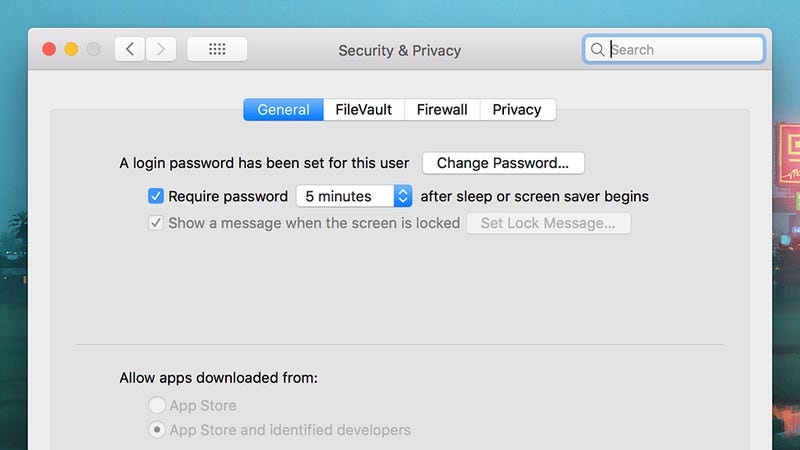
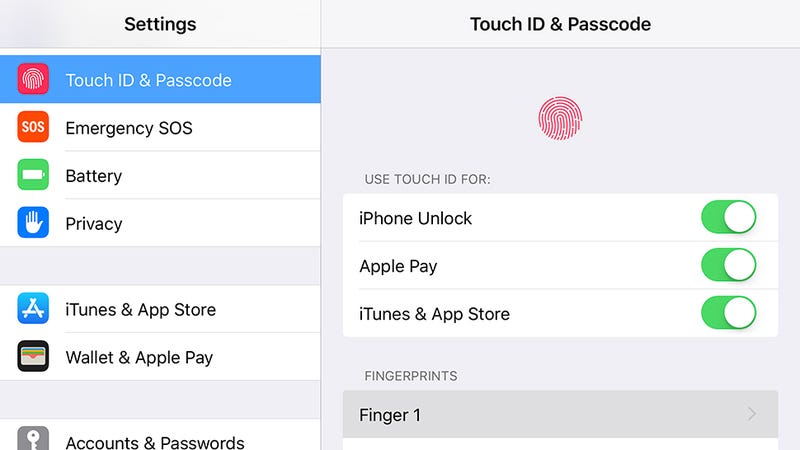
The options you need are easily found: Under Security & location in Android’s settings, under Touch ID & Passcode (or Face ID & Passcode) in the settings for iOS, under Accounts and Sign-in options in Windows settings, and under Security & Privacy in System Preferences on macOS.

You might also want to dial down the time-out delays on your devices, so they automatically lock almost immediately after you’ve stopped using them. If this delay is a long one, and you step away from your laptop or phone for a moment, someone else could take advantage.

This is under Display, Advanced, and Sleep in the Android Settings app, under Display & Brightness then Auto-Lock in the iOS Settings app, under System and Power & sleep in the Windows Settings app, and under Energy Saver in System Preferences on macOS.

Use biometric security

How to Keep Your Family and Friends From Snooping on Your Laptop and Phone
Image: Screenshot
The people you live with probably know you better than anyone else—it’s likely that they’ve seen you enter your phone PIN code hundreds of times, and they could probably have a good guess at your laptop password (they may have even asked for it to use your computer for something).

The point is, while PIN codes and passwords are very effective deterrents for complete strangers, they’re easier to get past for someone who sees you for a good chunk of every day, whether that’s because you’ve written your password down on a sticky note or they’ve been looking over your shoulder while you unlock your phone.

If you’ve got the option of using a fingerprint or a face scan to unlock your phone or laptop, then use it. As for your backup code and password, or if a code or password are your only options, make them difficult to guess and change them regularly. Using your birthday as your PIN is probably not the best idea if you want your roommate to leave your computer alone.

Remember that you’re more likely to let your guard down while you’re safe in the confines of your own home, so just be aware of who’s around you while you’re logging in and accessing sensitive sites and apps.

Check what you’re sharing

How to Keep Your Family and Friends From Snooping on Your Laptop and Phone
Image: Screenshot
Another advantage that the people you live with have over a random remote hacker—assuming they want to access your stuff—is that they’re on the same private wi-fi network as you. That makes it easier to get at your devices in certain situations.
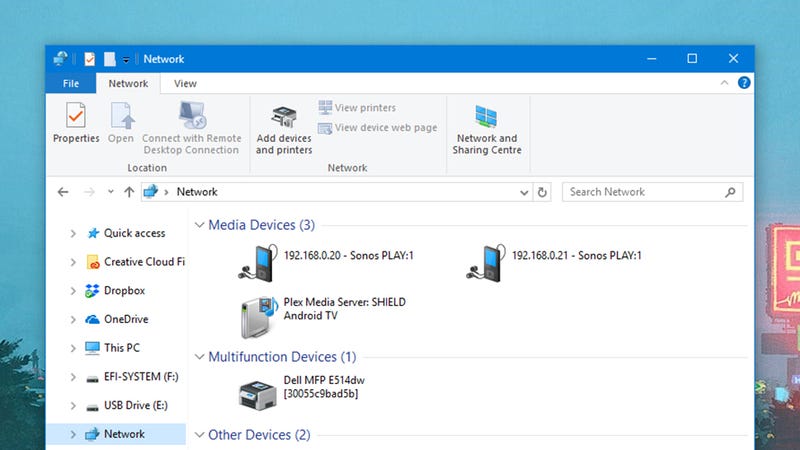
Make sure you’re not sharing more than you’d like to: On Windows (click Network in File Explorer) and macOS (click Sharing in System Preferences) it’s simple enough to check which folders are shared with the rest of the network. You’ll also see media servers, Chromecasts and the like in here, so remember that anyone on the network can get at these devices by design.

With a little bit of work, someone on your network can check all the traffic passing through that network, and potentially see some or all of the sites you’re visiting (though private information like credit card details and passwords will be encrypted).

The best and most complete way to protect against this, if you think someone in your home would make the effort to spy on your activities, is to get a VPN installed. You should also stick to HTTPS sites where your connection is encrypted, but this is now pretty standard for most of the popular sites on the web.

Put down limits

How to Keep Your Family and Friends From Snooping on Your Laptop and Phone
Image: Screenshot
There are probably going to be occasions when someone you live with wants to borrow one of your gadgets, and if you’re worried about them seeing stuff you’d rather they didn’t, you can take steps to make sure this doesn’t happen.

The easiest approach for Windows and macOS is to set up a separate user account that friends and family can use, so all of your apps and files are kept apart. On macOS you can also set up a guest user account, via Users & Groups in System Preferences, though this isn’t easily done on Windows—you’ll just have to set up a normal account through xxx and call it a guest account.

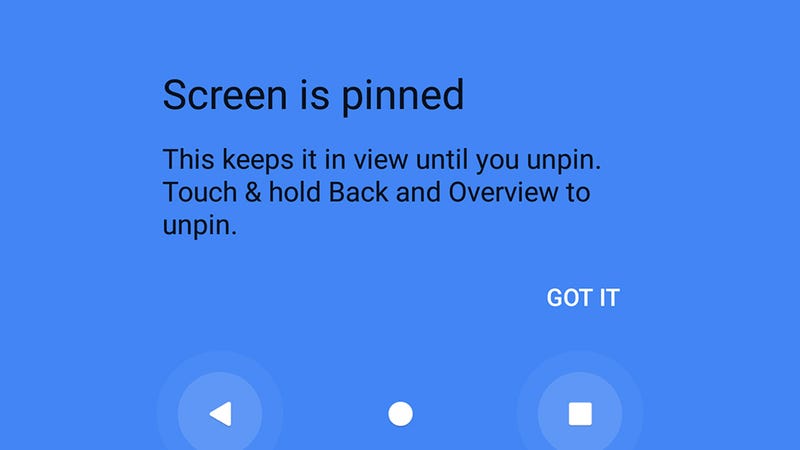
On Android, a good trick to remember is screen pinning. From Settings, tap Security & location, then Screen pinning and turn the feature on, with a PIN lock enabled. On the Overview screen (tap the square navigation button) you’ll then see a pin icon—select this and your friend or family member is locked inside that app until the Back and Overview buttons are pressed, and the PIN is entered. It means whoever is using your phone can only stay in the app you want them to stay in.

There’s a similar feature in iOS, called Guided Access, which you can find by tapping General then Accessibility from Settings. With the app that you want locked on screen, triple-click the Home button (or the Power button on the iPhone X) and again the phone will be restricted to that app only until you unlock your phone with your face, fingerprint, or PIN code.

Upgrade your security

How to Keep Your Family and Friends From Snooping on Your Laptop and Phone
Image: Amazon
Hopefully the people you find yourself living with are all trustworthy and loyal and easy to get on with, but if that’s not the case then you’ve got a choice of extra gear you can buy to keep your devices away from prying eyes and wandering hands.

A basic security safe will go a long way to keeping your laptop or phone well protected, and you can pick up models on Amazon for around the $60 mark. For even more peace of mind, you could even fix the safe permanently inside a cupboard or under a desk.

Speaking of locking down gadgets, laptop locks won’t set you back very much money at all, and will prevent someone from walking into your room and swiping the laptop while you’re out of the house/apartment/dorm room. Just check you’re buying the right cable for the lock type that’s integrated into your laptop before spending any cash.

If you’re really concerned about someone walking into your room while you’re away, then a security camera or motion sensor system isn’t too expensive or difficult to set up, and you’ve got a bunch of hardware options to pick from, many of which let you tune into a live feed right from your phone.

source:Gizmodo

Commentary: Art like "Black Panther" overturns stereotypes to reclaim the past and reimagine the future. To understand the film's power, you need to understand Afrofuturism.

There's a secret at the heart of Marvel's superhero adventure "Black Panther": the African nation of Wakanda, bursting with advanced technology and hidden from the world.

Afrofuturist icon Janelle Monae at the Los Angeles world premiere of "Black Panther" in January
Afrofuturist icon Janelle Monae at the Los Angeles
world premiere of "Black Panther" in January.
Alberto E. Rodriguez
But that's not the only thing this Afrofuturist epic uncovers. By drawing directly from Africa as its source material, "Black Panther" gives us a new way to think about a past, present and future rarely seen in mainstream movies. (Here's CNET's review of the film, which opened in US theaters on Friday and earlier worldwide.)

Marvel's latest superhero flick is the perfect example of the genre and movement known as Afrofuturism. It combines elements of sci-fi, fantasy and African history and culture to create a new world to explore and escape into.

The term Afrofuturism was coined in the early 1990s to refer to an analysis of African-American sci-fi. But it's since become a method for speculative thought, imagining "what if" scenarios in fiction, music and even architecture that reclaim and reinvigorate depictions of the black experience. By re-examining historical events through an African lens, we can more deeply understand where we are today and, in sci-fi creations like the high-tech culture of Wakanda, imagine possibilities beyond the status quo.

Watch this:How did Black Panther get his accent?

"Black Panther" star Chadwick Boseman, who plays T'Challa, said he expressly thought about how he should approach his accent as Wakanda's king from a purely African perspective.

"He's the ruler of a nation," Boseman told CNET in a November interview. "And if he's the ruler of a nation, he has to speak to his people. He has to galvanize his people. And there's no way I could speak to my people, who have never been conquered by Europeans, with a European voice."

Ryan Coogler directs Chadwick Boseman on the set of Marvel's "Black Panther"
Ryan Coogler directs Chadwick Boseman on the set of Marvel's "Black Panther".
Matt Kennedy/Marvel Studios 2018
The "Afro" in the Afrofuturism of "Black Panther," isn't just evident in the predominantly black cast, also featuring Angela Bassett as T'Challa's mother, Ramonda; Michael B. Jordan as zealous villain Killmonger; and Lupita Nyong'o as spy Nakia.

It's everywhere in the aesthetics, from the vibrant design of the sets and costumes to the fictional rituals of Black Panther's home, Wakanda. Look at the ochre earth that covers the floor of the Wakandan throne room. Or the thatched roofs on the country's gleaming skyscrapers. Or gadgets in the form of traditional necklaces and beads. Even the natural landscapes of Wakanda draw on the variety of Africa's beauty, with rolling green hillsides and magnificent snowcapped mountains taking the place of the stereotypical parched desert.

King T'Challa's throne room is an example of Wakanda's combination of African heritage and comic book technology
King T'Challa's throne room is an example of Wakanda's combination of African heritage and comic book technology.
Marvel Studios
Yet Afrofuturism is more than a visual style bringing African influences into the mainstream. Even before the first (white) men walked on the moon in the 1960s, African-American writers, artists and musicians like Sun Ra looked to space and to the fantasies of science fiction to find the freedom denied them on Earth.

"Afrofuturism does a couple of things," filmmaker, author and futurist Ytasha L. Womack explained in a keynote speech at Canada's McGill University in 2015. "It affirms the agency of people who pull from aspects of the African or black experience in the future ... but it also recovers this lost history, heritage and perspectives that aren't talked about in our education system. You can pull from these different aspects to shape your present -- and the future."

Representation of the historical black experience on screen has often focused on slavery, from 1915's "The Birth of a Nation" to 2013's "12 Years a Slave." In the present, black people are regularly depicted as passive victims of police brutality and gang warfare who come from violent, impoverished communities the world over.

In sci-fi's future or fantasy settings, black people frequently don't exist: How many are there in "Blade Runner 2049", for example? In sci-fi, people of colour are often replaced by green- or blue-hued aliens or other fantastic beings as a proxy, from "Avatar," "Alien Nation" and "Bright" to "Blade Runner" and "X-Men."

Lupita Nyong'o (left) and Letitia Wright (right) fire up Wakandan high technology
Lupita Nyong'o (left) and Letitia Wright (right) fire up Wakandan high technology.
Marvel Studios
In other words, humanity has been living with a Westernised narrative. But in "Black Panther," the black people and culture we see are very different from stereotypical representations. Wakanda's past is free of colonisation and enslavement. Wakandans of the present are active citizens with agency over their country's resources. And they combine their chief resource, Vibranium, with their knowledge and ingenuity to develop futuristic technology outstripping the rest of the world.

"One of the things that we really wanted to make sure about Wakanda is the technology, and I think that that's something that all the fans want to see," the film's production designer, Hannah Beachler, told Black Girl Nerds. "The other thing that we really talked about was keeping the tradition of several different African tribes. We really delved into what that was and how we mix this new and this old."

For Beachler, Afrofuturism means taking a familiar narrative and "mixing it up and reowning it ... going back to an older time and modernizing it, and reclaiming it, and owning it in a different way."

Art meets the Afrofuture

You'll find Afrofuturism in fiction such as Octavia Butler's 1976 time-travelling slave narrative novel "Kindred", or more recently, the novel "Who Fears Death" by Nigerian-American writer Nnedi Okorafor. Set in a postapocalyptic future version of Sudan, "Who Fears Death" is scheduled to be made into an HBO series produced by "Game of Thrones" author George R.R. Martin.

Even before academic Mark Dery coined the term Afrofuturism in 1993, we saw it in the work of artists like otherworldly jazz performer Sun Ra. His experimental music, extraterrestrial-inspired cosmic philosophy and flamboyant performances produced works like the psychedelic 1974 film "Space Is the Place," in which he comes to us as a "Universal Being" not of this dimension.

Sun Ra and his Arkestra look to the future in 1978
Sun Ra and his Arkestra look to the future in 1978.
Getty Images
African-American singer, songwriter and record producer George Clinton of Parliament/Funkadelic fame shared many of the cosmic viewpoints of Sun Ra. His music was infused with an Afrofuturist vision of protest, hope, intergalactic mythology and fun, and he was one of the many who laid the groundwork for the evolution of electro. In the 1980s, hip-hop ambassador Afrika Bambaataaappeared as a being somewhere between a robot and an ancient Egyptian godhead for his influential 1982 hit "Planet Rock."

More recently, my personal favourite, Janelle Monae, adopted an android alter ego to take us on a tour of futuristic museums paying homage to rebel artists on the albums "The ArchAndroid" and "Electric Lady."

"I watched 'Metropolis' and was really inspired by it," Monae told The Irish Times. "Then I started to get into 'Alien' and 'Blade Runner', and I started to look at the android as the form of the other, all the discrimination that the android faced in these films. I could relate to that, the idea of being the minority within the majority."

Monae's next album and film will be titled "Dirty Computer" and will continue to explore sci-fi themes. No wonder she was the perfect choice to appear in "Hidden Figures," the award-winning 2016 movie reclaiming the contribution of African-American women to the space race.

By looking to both the past and the future and imagining new possibilities in stories like "Black Panther," we can inspire the present. At Afro Futures_UK, a UK-based collective of researchers, artists, programmers and activists, we explore new ways of seeing ourselves. Through seminars, workshops and social media, our black-led group aims to get more people involved in science, technology and the arts to do our bit toward self-determination and liberation.

As "Black Panther" sinks its teeth into huge box office success, Afrofuturism is now mainstream. A smash hit Marvel blockbuster made by a black cast, director and filmmakers should pave the way to change how Hollywood portrays Africa, the birthplace of humanity. That's the irresistible freedom of Afrofuturism.

Watch this:Chadwick Boseman loves a good challenge

source:CNet

MKRdezign

Contact Form

Name

Email *

Message *

Powered by Blogger.
Javascript DisablePlease Enable Javascript To See All Widget