Articles by "Google"

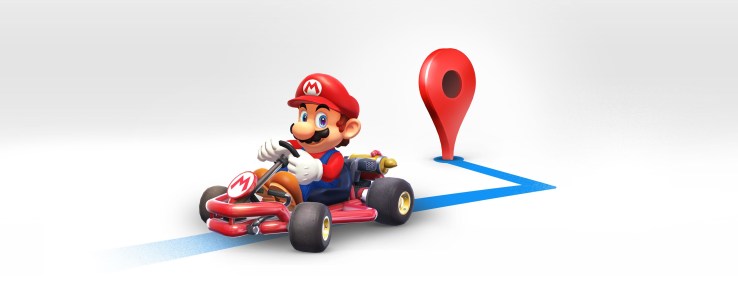
Mario can now guide your route in Google Maps
It’s Mario Time! Beloved gaming character Mario is coming to Google Maps, thanks to a partnership between Google and Nintendo ahead of Mario Day, March 10. (MAR10…get it, Mario?) In addition to the various deals and sales on Nintendo games, the mustachioed plumber will also make an appearance in Google Maps’ navigation, if you opt in to have Mario accompany you on your journey.

The feature, which Google announced this morning, is available in the latest update in the Google Maps app on both iOS and Android.

After entering in your destination, you’ll notice a yellow question mark “?” icon at the bottom right of the app’s screen. Tap this, and you’ll get a prompt to enable “Mario Time.”

Mario can now guide your route in Google Maps
From then on, the navigation arrow in Google Maps will instead be Mario – who, in his little red go-kart, will then be your companion for your entire trip. The integration will be available for a full week, says Google, so you can enjoy using Mario for longer than just on Mario Day alone.

You can also choose to screenshot your route and share it to @GoogleMaps on Twitter and Instagram with the hashtag #MarioMaps, Google suggests. But of course, don’t share personal details like your work or home address, if you do so.

Mario can now guide your route in Google Maps
This isn’t the first time Google has had a little fun with Google Maps, as you may recall.

The company has in the past unleashed Pac-Man on city streets in Maps, let Google Maps streetview users go inside Doctor Who’s TARDIS, and has let you travel by Loch Ness Monster, among other things. Plus, Google and Nintendo have worked together before on silly stuff like this, as with the April Fool’s day prank involving the “launch” of Google Maps 8-bit for NES.

But in this case, adding Mario to Maps feels more like a brand advertisement, rather than just a fun trick. We asked Google if that was the case. However, a company spokesperson confirmed that no money exchanged hands in its business deal with Nintendo.

The Mario feature will begin rolling out today – so make sure you’ve got you’ve got the latest version of Google Maps installed if you want to try it out.

source:TechCrunch

Google’s messaging strategy may still seem chaotic to many, but the basic tenet of how it wants the public to think about Hangouts, Hangouts Meet, Hangouts Chat, Allo and Duo is that Allo/Duo are for consumers and Hangouts Meet/Chat are for business users. Hangouts itself is meant to… actually, I don’t know what it’s meant to be now and I’m not sure Google does either. What I do know, though, is that you are probably neither an Allo nor Duo user, even though both are perfectly competent messaging and video chat apps. Just in case you do use Duo, though, here’s some good news: You can now leave voice and video messages when nobody picks up your call (or politely declines to talk to you).
Google’s Duo video chat app gets video- and voicemail
Duo users can now leave up to 30-second messages and your contact will see them in the Duo app. After watching the video or listening to the message, your contact can call you right back, at which point you can decide if you want to pick up the call or just let it go to videomail, too.

Google notes that all messages are end-to-end encrypted and that the update will start rolling out to Android and iOS users today, and that all users worldwide should see it within the next few days.

While I don’t think Google’s Allo/Duo strategy is working, or that mainstream users are even aware of it, Duo is a perfectly fine video chat app that puts a few interesting twists on this concept. Just like with Allo, though, none of my friends are on it and Hangouts already has a perfectly good video chat option.

source:TechCrunch

Machine learning proves its worth for new video effects tech: distinguishing between faces and backgrounds at 100 frames per second.

Google's AI software can detect the subject of a  video and change the background
Google's AI software can detect the subject of a
video and change the background.
Google
Google's artificial intelligence researchers have a new trick up their sleeves: giving selfie videos a new background the way you can with still photos today.

Switching out background scenery is a decades-old technology, but it's generally complicated and time-consuming -- think of making movies with superheros acting in front of green screens so computers can later replace the uniform green color with digital effects like exploding buildings. Having 3D scene data, for example extracted from newer iPhones' twin cameras, makes the process only a little easier.

Google, though, trained a neural network with lots of carefully labeled imagery that helped it learn how to distinguish facial features -- eyes, hair, glasses, mouths, and so on -- from everything else. The result is a system that can swap out backgrounds fast enough to keep up with video. Digital video frames whip by at 30 frames per second, but Google's technology works at 40 frames per second on a Google Pixel 2 phone and more than 100 frames per second on an Apple iPhone 7.

Want to try it out for yourself? Sorry. For now, only a pretty small number of high-profile YouTubers with access to the YouTube stories service, which offers an ability to share Snapchat-esque short videos.

Google detailed the research in a blog post Thursday.

"Our new segmentation technology allows creators to replace and modify the background, effortlessly increasing videos' production value without specialized equipment," Google programmers Valentin Bazarevsky and Andrei Tkachenka said in the blog post.


Google uses machine learning in its video segmentation technology that can determine background imagery that can be replaced with something funny or eye-catching
Google uses machine learning in its video segmentation technology that can determine background imagery that can be replaced with something funny or eye-catching.
Google
The technology shows how versatile AI and machine-learning technology is for solving complex computational problems. Neural network technology doesn't have to know endless rules, like "faces have two eyes, located above the nose, unless the face is viewed in profile, in which case there may only be one eye visible, unless the subject is wearing dark glasses." It just has to be trained on enough photos, labeled by humans who do actually know what a face is, that it eventually learns the patterns. It's proven a remarkably useful technology for everything from screening out email spam to predicting what word you're trying to type into your phone.

Google already uses AI in a related feature today on its Google Pixel 2 phones. The phones only have single cameras, but AI helps blur backgrounds for portrait-mode photos.

source:CNet News

Now any corporate customer signed up to G Suite can use the new messaging app with dedicated chat rooms.

Google's messaging app, Hangouts Chat, comes out of beta
Google's messaging app for groups -- Hangouts Chat -- used to be only for people in the company's early adopter program. But this week, Google is releasing it to any corporate customer who wants to use it.

Hangouts Chat lets co-workers, or any group of people, message each other in dedicated chat rooms. People can also share files, photos and videos. These messages can either be private or shared with various groups.

"From direct messages to group conversations, Chat helps teams collaborate easily and efficiently," Scott Johnston, director of product management for Google Drive, wrote in a blog post Wednesday. "With dedicated, virtual rooms to house projects over time -- plus threaded conversations -- Chat makes it simple to track progress and follow up tasks."

This may sound familiar. That's because there are already a lot of other services like this out there, such as Slack, Microsoft Teams and Dropbox, which aim to make work meetings and collaboration easier.

Hangouts Chat is included in Google's G Suite (the company's cloud-based productivity and collaboration platform that businesses pay for), and therefore is deeply integrated with other Google apps like Calendar, Drive and Docs.

People who want to use Hangouts Chat need to be signed up to G Suite. It will become available over the next week. People can access Hangouts Chat via a web browser client or through an app on iOS and Android.

Security: Stay up-to-date on the latest in breaches, hacks, fixes and all those cybersecurity issues that keep you up at night.

source:CNet News

Apple now relies on Google Cloud Platform and Amazon S3 for iCloud data
It’s no secret, Apple has been relying on third-party cloud companies for iCloud. And CNBC spotted an interesting tidbit in Apple’s own documents. The company now relies on Amazon S3 and Google Cloud Platform’s storage product to store iCloud data.

Back in 2016, CRN reported that Apple signed with Google for cloud storage. But Apple’s document represents the first official confirmation that this deal happened.

You can find the information in Apple’s iOS 11 security guide that was published in January 2018. The company mentions that user files are divided into tiny chunks and encrypted. The encryption keys and metadata information are stored on Apple’s own servers. But the encrypted files are stored on third-party services.

While users have no idea that Amazon and Google are managing their iCloud data, Amazon and Google can’t do anything with those files without the encryption keys. So it seems highly unlikely that Amazon and Google are looking at your data.

“The encrypted chunks of the file are stored, without any user-identifying information, using third-party storage services, such as S3 and Google Cloud Platform,” you can read in the document.

In the past, Apple has mentioned Microsoft Azure in its partners. The wording of the document isn’t really clear. Apple could be using more storage services without naming them directly.

In all cases, this is a great example of asymmetric competition. While Apple and Google are fighting really hard to grab market share of the smartphone market, Apple is also Google’s client. Apple also competes with Amazon and Microsoft in other areas. So Apple would need to step up its cloud hosting game to cut ties with its competitors altogether.

source:TechCrunch

Google Crushes Dreams of a Universal Dark Mode For Android, For Now
Some Android users watching Google’s Issue Tracker board got very excited this week when one of the company’s engineers confirmed that a dedicated dark mode for night browsing would be “available in a future release,” but alas, this was not to be.


Per TechCrunch, instead of the much-desired dark mode feature—which some users insist is easier on the eyes, potentially reduces battery drain, and just looks plain cool—the note apparently referred instead to a developer feature intended to improve dark mode support for third-party app creators. In a post to the Issue Tracker board, the engineer clarified:
What we *have* added in a future Android release is a developer-facing setting (via Developer Options) to toggle the -night UI mode qualifier, which will make it easier for developers to create and test apps that implement night mode. This qualifier has been in the platform since Froyo (SDK 8) and globally modifiable via UiModeManager since Marshmallow (SDK 23); however, there was never an explicit toggle made available anywhere in Settings.
As The Next Web noted, users can simply apply custom-built Android screens to achieve much of the same effect, while numerous apps already have night mode built including Twitter, YouTube, and a few stock internet browsers. Some Android phones already toggle themes depending on the time of day, though it’s not the same as a manual setting that users can apply across the board.

The engineer added that the continued lack of a universal dark mode is at least not because they are wasting time on a “Hot Dog Mode”:
If it’s any consolation, we will also not be adding Hot Dog Mode (where all UI elements are yellow and red).
It’s a shame that dark mode isn’t coming to Android yet, since it’s clearly the best way to run apps even in the daytime (the night mode users will rule this galaxy!). Seeing as it’s pretty easy to replicate most of the mode’s functionality with third-party tools or simply turn on Android’s existing blue light filter (though this ends up looking more like f.lux than what users might expect out of a night mode), this might not the most pressing feature add. Still, one can dream.

source:Gizmodo

Google needs to give the AirPods better competition
In the race for in-ear AI, Apple has the clear advantage despite the fact that their intelligent assistant is one of the dumbest of the bunch.

Yesterday, reports emerged that Apple was working on a pair of follow-ups to its Airpods headphones that could bring them always-on Siri functionality as well as a splash-proof design. As we think about all the things that Apple could do right with its next set of wireless earbuds, it’s easy to reflect on all that Google did wrong with its Pixel Buds and how much of an opportunity they still have.

Google Assistant lends so much potential to a pair of smart wireless earbuds from Google. The fact is that Siri doesn’t hold a candle to Google Assistant in many ways, and while the functionality of voice control on the AirPods is largely focused on music and calls, the superior intelligence of Google Assistant should make them a much clearer companion for a set of earbuds.

Hardware is still very much a side project for Google, but as the company prioritizes home assistant hardware, it really doesn’t make sense that they’re not putting more resources into a pair of wireless headphones. The Pixel Buds need a more purposeful design that minimizes friction and delivers Assistant insights more effortlessly in a package that feels like more than just a follow-on.

Google needs to give the AirPods better competition
The AirPods are an engineering marvel, and while some of the functionality of the Pixel Buds was interesting — mainly their ability to interface with the Pixel 2 for language translation — they fell flat on design. Google needs to rethink its wireless earbuds from the ground-up and focus more on creating something with the sleekness of the Pixel phones rather than the fabric-obsessed friendliness of their Home devices. Cutting the woven cord and moving to a truly wireless form factor is a necessary step, as is shrinking down the size of the Bud part of the product. It’s really not about the sound quality as much as it is about the connectivity and the lack of friction. While FastPair has been a great step in simplifying the bluetooth pairing, there are still some quirks that aren’t present with Apple’s W1 chip.

While Siri is always quick to refer you to search results when it doesn’t have an answer (a frequent occurrence), Assistant’s optimization for its display-free Home devices has led it to order functionality around the assumption that there’s not always a screen available to default to. Today, Google announced that it was bringing location-based notifications and voice-optimized routine functionality to its Home devices so it could complete regular custom tasks without you having to pepper it with commands, stuff like this would be ideal for earbuds that are always-listening, something that Google could do much more with than Apple.

Even as features take months to roll out, Google has still shown a degree of nimbleness on the voice assistant front that Apple can’t match in annual WWDC keynotes. While Amazon is just as quick with Alexa, Google Assistant’s deepening integration with Android establishes an arena where they should be the clear champion.

AirPods are clearly the best wireless earbud that an Apple user can own and even with the reduced functionality that still might be true of Android phones. People are building tools to bring iOS-only feature sets to Android and that fact alone should suggest Google take a more serious look at its own hardware and the opportunity that it’s losing out on.

source:TechCrunch

MKRdezign

Contact Form

Name

Email *

Message *

Powered by Blogger.
Javascript DisablePlease Enable Javascript To See All Widget