The Pyeongchang Winter Olympics' internal servers crashed in the attack, as did public Wi-Fi. Officials confirmed the attack, but won't identify the perp.
VCG/Getty
Reports in January from cybersecurity company McAfee claimed that organisations associated with the Pyeongchang Winter Olympics were targeted by a hacking "campaign." Perhaps unsurprisingly, that wasn't the last cyberattack aimed at the Winter Olympics.
Officials confirmed Sunday that the Winter Games were hit by a cyberattack during Friday's opening ceremony, though they opted not to reveal the attackers.
"We know the cause of the problem but that kind of issues occurs frequently during the Games. We decided with the [International Olympics Committee] we are not going to reveal the source," Pyeongchang organising committee spokesman Sung Baik-you told reporters, according to Reuters. "All issues were resolved and recovered [Saturday] morning."
The attack crashed some of the Winter Games' internal servers as well as the public Wi-Fi, South Korea's Yonhap News Agency reported, which lead to some customers being unable to print out their tickets for the show.
Russia, a country not represented in the Winter Games due to doping concerns, predicted before the event that it would be blamed for a cyberattack on the festivities. "We know that Western media are planning pseudo-investigations on the theme of 'Russian fingerprints' in hacking attacks on information resources related to the hosting of the Winter Olympics Games in the Republic of Korea," Russia's foreign ministry said, according to Reuters.
Meanwhile, fingers are often pointed at North Korea following cyberattacks and hackings, with the controversial country being blamed by the US for the WannaCry hacks of last year, and other breaches dating back to 2009. However, it comes at a time when North and South Korea, nations who've been at war with one another since the 1950s, are making efforts at unity.
A website for fans of doctored videos used its visitors’ computers to mine Monero. It’s the latest way hackers can abuse your computer’s processing power.
Using a script called Coinhive, a website for fans of deepfake videos mined cryptocurrency Monero on visitors' computers, researchers found
Your computer can do amazing things for you, but what can it do for hackers? Try this: make money.
That's what happened when web users navigated to a forum for fans of doctored videos, called deepfakes. According to researchers from Malwarebytes, code running on the website commandeered visitors' computers to mine Monero, a form of cryptocurrency, as long as the webpage was open on the browser.
It's sneaky, strange and possibly genius. "If they had enough traffic, that would absolutely generate a lot of profit," said Stephan Simon, a security researcher at Binary Defense Systems.
Just because this happened on a deepfakes forum, don't think this couldn't happen to you. Sure, the deepfakes phenomenon is all kinds of weird, involving fake celebrity videos that insert actor Nicolas Cage into movies he didn't star in, or any celebrity into porn scenes they never filmed. But hackers are trying to mine cryptocurrency on every kind of device, harnessing the computing power of regular people to cash in on the bonanza of blockchain-driven digital currency.
It even has a name: cryptojacking.
On Monday, a Chinese cybersecurity firm said it found malicious software on Android phones and smart TVs that was mining Monero for hackers. In January, a security researcher revealed that hackers could use public Wi-Fi networks to mine cryptocurrency on computers that connect to them. And as far back as September, another security researcher found cryptojacking software on official Showtime Network websites.
Experts say two things have helped bring about this state of affairs. First, the growing value of cryptocurrencies like Monero, Bitcoin and Ethereum has put a premium on computing power. It takes a lot of oomph, and time, from computers to run the software that creates more Monero, and it's a stealthy shortcut to use a crowd of strangers' computers without their knowledge.
Second, the creation of mega-botnets like Mirai has shown that large numbers of computers, phones and smart home devices can be harnessed to serve a hacker's whims.
"When there was more or easier money to be had, there was motive" to build more botnets, Simon said. "Cryptocurrency has helped it accelerate."
Some forms of cryptojacking work only while a web page is open, and others keep your computer chugging under its orders even after you close the browser tab. Hackers use something called Coinhive, a library of code written in Javascript, to force the computer to mine Monero.
Cryptojacking is only so harmful to its victims. In essence, it slows computers way down, and potentially heats them up. Just imagine that sad whining sound you hear when your computer's fan has kicked into high gear.
Some web browsers block the malicious scripts. Opera announced in Decemberthat it would block the scripts in a beta version of its eponymous browser, saying they were bad for users' computers. It calls the feature "NoCoin."
"Bitcoins are really hot right now, but did you know that they might actually be making your computer hotter?" the company said in its announcement.
Victims of cryptojacking do tend to be dipping their toes into the shady end of the internet. In addition to deepfake forums (which were kicked off Reddit due to ethical concerns), torrenting and porn websites have served up cryptojacking scripts, experts noted.
Fans of deepfakes might've become targets because there's a higher chance they have powerful computers, said Chris Boyd, a malware researcher at security firm Malwarebytes who examined the deepfakes forum running Coinhive. That's because it takes a certain amount of processing power to make the fake videos.
But then again, other types of sites have fallen victim to the ploy too. So basically, no one's safe.
source:CNet
Many of us are more security savvy than ever when it comes to our phones and laptops, but there’s one threat you might not be protecting against—the people inside your own home. Whether you’re worried about nosey housemates, clumsy kids, or horrible siblings, these are the steps to take to make sure your stuff stays private.
Lock it up
Image: Screenshot
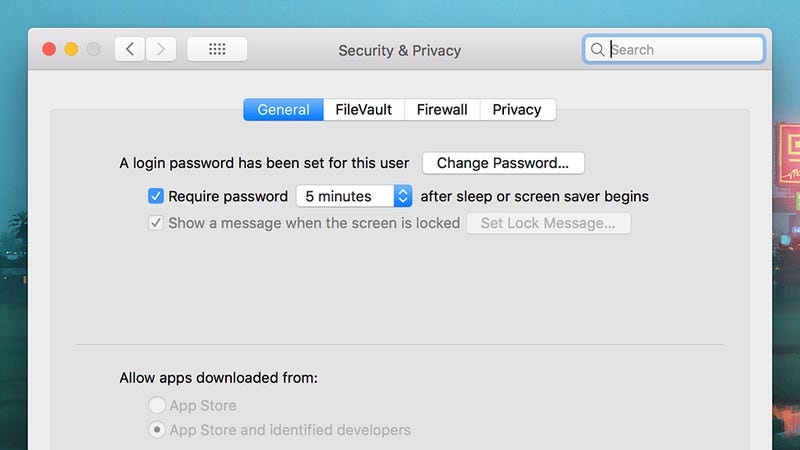
We’re assuming your smartphone and laptop are protected by some kind of password, PIN pattern, fingerprint scan, or face scan—and if not, get something in place immediately. It’s all that’s preventing anyone who passes by from getting into all your apps and files.
The options you need are easily found: Under Security & location in Android’s settings, under Touch ID & Passcode (or Face ID & Passcode) in the settings for iOS, under Accounts and Sign-in options in Windows settings, and under Security & Privacy in System Preferences on macOS.
You might also want to dial down the time-out delays on your devices, so they automatically lock almost immediately after you’ve stopped using them. If this delay is a long one, and you step away from your laptop or phone for a moment, someone else could take advantage.
This is under Display, Advanced, and Sleep in the Android Settings app, under Display & Brightness then Auto-Lock in the iOS Settings app, under System and Power & sleep in the Windows Settings app, and under Energy Saver in System Preferences on macOS.
Use biometric security
Image: Screenshot
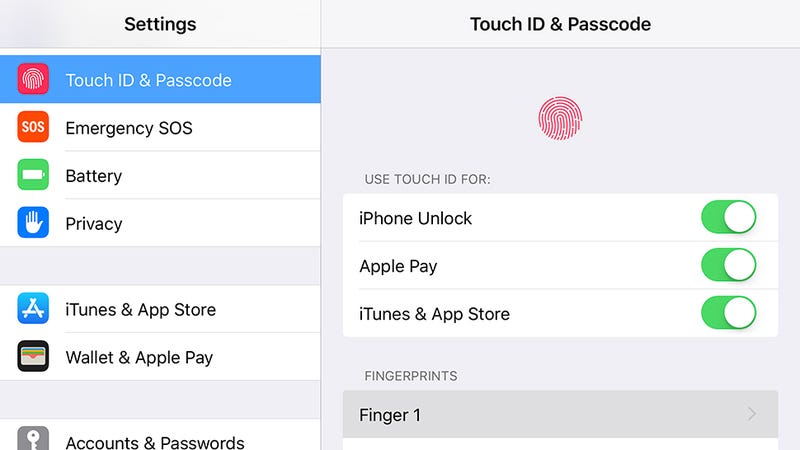
The people you live with probably know you better than anyone else—it’s likely that they’ve seen you enter your phone PIN code hundreds of times, and they could probably have a good guess at your laptop password (they may have even asked for it to use your computer for something).
The point is, while PIN codes and passwords are very effective deterrents for complete strangers, they’re easier to get past for someone who sees you for a good chunk of every day, whether that’s because you’ve written your password down on a sticky note or they’ve been looking over your shoulder while you unlock your phone.
If you’ve got the option of using a fingerprint or a face scan to unlock your phone or laptop, then use it. As for your backup code and password, or if a code or password are your only options, make them difficult to guess and change them regularly. Using your birthday as your PIN is probably not the best idea if you want your roommate to leave your computer alone.
Remember that you’re more likely to let your guard down while you’re safe in the confines of your own home, so just be aware of who’s around you while you’re logging in and accessing sensitive sites and apps.
Check what you’re sharing
Image: Screenshot
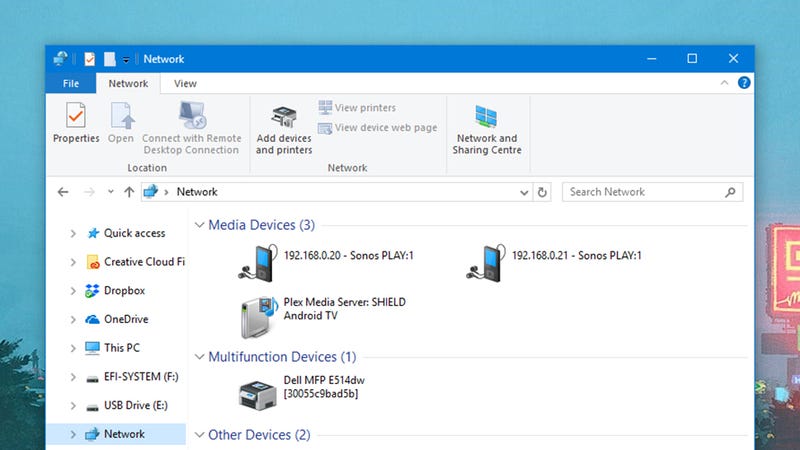
Another advantage that the people you live with have over a random remote hacker—assuming they want to access your stuff—is that they’re on the same private wi-fi network as you. That makes it easier to get at your devices in certain situations.
Make sure you’re not sharing more than you’d like to: On Windows (click Network in File Explorer) and macOS (click Sharing in System Preferences) it’s simple enough to check which folders are shared with the rest of the network. You’ll also see media servers, Chromecasts and the like in here, so remember that anyone on the network can get at these devices by design.
With a little bit of work, someone on your network can check all the traffic passing through that network, and potentially see some or all of the sites you’re visiting (though private information like credit card details and passwords will be encrypted).
The best and most complete way to protect against this, if you think someone in your home would make the effort to spy on your activities, is to get a VPN installed. You should also stick to HTTPS sites where your connection is encrypted, but this is now pretty standard for most of the popular sites on the web.
Put down limits
Image: Screenshot
There are probably going to be occasions when someone you live with wants to borrow one of your gadgets, and if you’re worried about them seeing stuff you’d rather they didn’t, you can take steps to make sure this doesn’t happen.
The easiest approach for Windows and macOS is to set up a separate user account that friends and family can use, so all of your apps and files are kept apart. On macOS you can also set up a guest user account, via Users & Groups in System Preferences, though this isn’t easily done on Windows—you’ll just have to set up a normal account through xxx and call it a guest account.
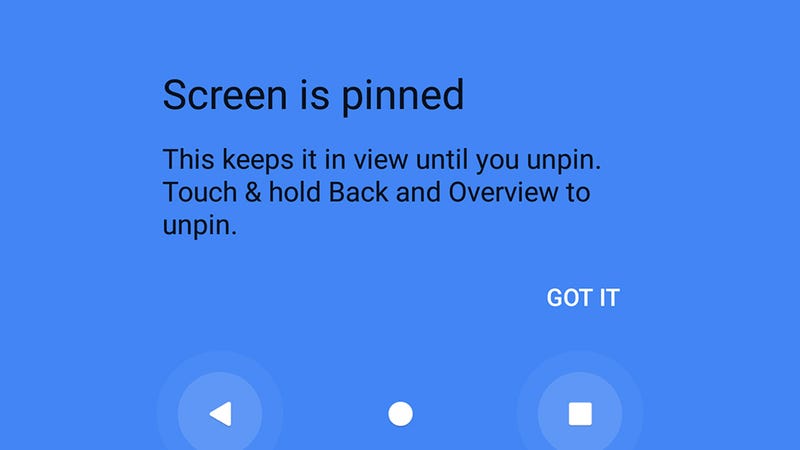
On Android, a good trick to remember is screen pinning. From Settings, tap Security & location, then Screen pinning and turn the feature on, with a PIN lock enabled. On the Overview screen (tap the square navigation button) you’ll then see a pin icon—select this and your friend or family member is locked inside that app until the Back and Overview buttons are pressed, and the PIN is entered. It means whoever is using your phone can only stay in the app you want them to stay in.
There’s a similar feature in iOS, called Guided Access, which you can find by tapping General then Accessibility from Settings. With the app that you want locked on screen, triple-click the Home button (or the Power button on the iPhone X) and again the phone will be restricted to that app only until you unlock your phone with your face, fingerprint, or PIN code.
Upgrade your security
Image: Amazon
Hopefully the people you find yourself living with are all trustworthy and loyal and easy to get on with, but if that’s not the case then you’ve got a choice of extra gear you can buy to keep your devices away from prying eyes and wandering hands.
A basic security safe will go a long way to keeping your laptop or phone well protected, and you can pick up models on Amazon for around the $60 mark. For even more peace of mind, you could even fix the safe permanently inside a cupboard or under a desk.
Speaking of locking down gadgets, laptop locks won’t set you back very much money at all, and will prevent someone from walking into your room and swiping the laptop while you’re out of the house/apartment/dorm room. Just check you’re buying the right cable for the lock type that’s integrated into your laptop before spending any cash.
If you’re really concerned about someone walking into your room while you’re away, then a security camera or motion sensor system isn’t too expensive or difficult to set up, and you’ve got a bunch of hardware options to pick from, many of which let you tune into a live feed right from your phone.
Most of us tend to think people trying to open the door when we’re away want to steal stuff. Amazon.com would like to change that assumption.
The e-commerce giant shelled out a reported $1.1 billion this week to acquire Ring, a developer of Wi-Fi-connected door bells. The move follows the rollout last year of Amazon Key, a smart lock and camera system for in-home deliveries to customers who don’t want packages sitting outside.
But Amazon’s not the only one placing high value on front-door tech. In the age of on-demand delivery, service providers have long seen the typical low-tech door as an impediment to expansion. Smart-lock developers and home security companies also have been putting resources into the space, alongside a number of venture investors.
As we reported a few months ago in an overview of smart-lock and building access investments, the way people open the front door hasn’t changed much in a century. Most of us still get in by turning a flat metal key into a lock. Visitors ring old-fashioned door bells. And there’s commonly no digital record of who came or why.
There’s a lot of money going into changing that status quo. Since last year, venture investors have poured more than $200 million into an assortment of companies with businesses and technologies tied to keys, locks and building access. To date, those companies have more than $500 million, according to an analysis of Crunchbase funding data.
Ring, which raised $200 million in venture funding, is one of two heavily funded companies to be acquired in recent months. In October, August Home, a smart-lock developer that had raised more than $70 million in venture funding, sold to ASSA ABLOY Group, the largest global supplier of door opening products, for an undisclosed sum.
There’s good reason to think the up cycle for smart locks and entry systems has further to go. For one, to a large degree, lock and building access-related investments are an extension of the connected home space, and growing adoption of connected home systems provides a major entry point for key and door tech.
Many legitimate businesses also want an easier way to get through the door. After all, delivering things to customers’ doors, either inside or out, constitutes an industry with a collective valuation in the trillions of dollars. Amazon.com alone is valued at more than $700 billion.
Additionally, anecdotally, it does appear urban humans over recent decades are trending toward greater laziness. Increasingly, people want their laundry, meal kits, produce, shaving supplies and pet treats delivered to their doors. Just as we used to think of going to the store as a pain, we will soon consider stepping outside to pick up a package as the height of inconvenience.
Those trends might not be great for the state of humanity. But they are bullish indicators for the smart lock industry.
General Motors' car sharing service, Maven, is set to expand across the northern US border for the first time.
Maven will continue its North American takeover by heading to Toronto, Canada's largest city. It isn't just dipping its toes in the water, either -- at launch, Maven will offer 40 vehicles across GM's vast portfolio, including several models of Chevrolet, GMC and Cadillac.
Car ownership is growing increasingly optional, especially in cities that have both car sharing options and stout public transport options. Maven
Grabbing a car with Maven is as easy as opening up the app, applying for a free membership and securing a vehicle. There's no membership fee, so you only pay for using the car, which will start at CAD$9 (about USD$7) per hour. Maven selected a wide variety of parking locations across Toronto based on where it expects its users to hang out -- Toronto natives can expect to see Maven cars in Bloor West Village, The Entertainment District, Ryerson University, Financial District and several other spots.
Since it has the backing of a major auto manufacturer, all the cars available through Maven are brand spanking new, and thus come equipped with all sorts of tech, like a 4G LTE Wi-Fi hotpost, Apple CarPlay and satellite radio.
Maven's portfolio of products doesn't end with car sharing. The company also runs Maven Gig, which allows users to rent a Chevrolet Bolt EV by the week for gig-economy jobs like Uber or GrubHub. This one's only available in certain US locations for now, but if it passes regulatory muster, it wouldn't be a surprise if it expanded to other places where Maven has a foothold -- and a supply of Bolt EVs.
Chevy Bolt brings big EV convenience in a small package
VW is betting big on connected cars by making all of its cars capable of communicating via WLANp.
Volkswagen wants to let you know that it has its eye on the future, specifically where vehicle-to-vehicle and vehicle-to-environment communication is concerned. You see, VW has committed to having all of its production vehicles adopt the WLANp (aka IEEE 802.11p) wireless communication protocol as standard by 2019 for use in Europe.
Why is that important? Because having one large manufacturer adopt a standard that allows cars to communicate with one another will likely snowball into other manufacturers adopting the same standard, which in turn will enable things like platooning and make autonomy more feasible and easier to implement.
By the 2020 model year, all European VWs will be able to communicate via the WLANp protocol. Antuan Goodwin/Roadshow
WLANp is especially cool because it has already been rigorously tested for security and reliability, and the technology behind it isn't particularly new. In fact it's related to the Wi-Fi that you're probably using to read this article. This is why VW can get it into production so quickly. Essentially, the protocol will allow vehicles within approximately 1,500 feet of each other to communicate information regarding road and traffic conditions and also to communicate with smart traffic-control devices like lights and signs to help optimize traffic patterns.
It's not clear what effect if any the adoption of WLANp will have on American market cars and whether VW and other manufacturers will opt to start pushing this technology in the good old US of A.
One of the most daring -- and expensive -- phones of 2017, the iPhone X has some great design and software features that attempt to justify the stratospheric $1,000 price. It's got ultraslim bezels and an all-screen face, an excellent camera and cutting-edge face-scanning technology.
Of course, the iPhone X has more than a few maddening feature flaws that make me shake my head in disappointment, but after using the X for over two months, I've come to really love some of the subtler changes. They successfully make it much smoother and more useful than previous iPhones. And when you're using the phone for hours a day, every day, even small conveniences add up.
Here are the five that made the biggest impression on me, plus one runner-up that needs a little work.
Lock screen notifications for your eyes only
iPhone X gets cryptic with messages until you make eye contact. Jason Cipriani/CNET
Your notifications and alerts aren't anyone's business but your own, which is what makes this anti-Peeping Tom feature so great.
Give the lock screen a sidelong glance and your list of notifications simply shows you the apps that are alerting you: Gmail, text, Facebook Messenger and so on.
But when the iPhone X's depth-sensing Face ID camera recognizes you, the details of the alert fill in. You suddenly see the sender and the actual message; either the full text if it's short or an excerpt if it's long.
When Android phones begin adding similar advanced face-scanning technology -- remember, Qualcomm is making this technology available to all phones that use its Snapdragon 845 chipset -- I expect to see them adopt this approach, too.
Face ID saves time logging into websites
Face ID doesn't always work when I want it to, but when it does, it can whisk me right into password-protected websites such as Amazon and my bank. That saves me from having to type my password a million times. It works similarly to registering your fingerprint to access a site -- except you literally never have to lift a finger.
This is a feature you opt in to, so you don't have to use it if you prefer tight password control. You can also use Face ID to authenticate purchases, but that'll happen on a seller-by-seller basis.
Fancy portrait selfies
You can take selfies with the same cool lighting effects asyou can with the rear cameras. Óscar Gutiérrez/CNET
With the iPhone X, Apple wants you to take even more portrait shots.
Both the iPhone 8 Plus and iPhone X give you new portrait lighting options (in beta) to give bokeh-effect photos some additional theatrical drama. But only the iPhone X extends the same courtesies to the front-facing camera.
Flip over to selfie mode and you're able to tap Portrait to gently blur the background and make your mug pop. You'll also be able to choose from lighting options: natural, studio, contour, stage and stage light mono. These can make a big difference in rounding out your self-portrait.
One thing to keep in mind: While Apple uses two rear cameras to achieve portrait mode on the iPhone X, 8 Plus and 7 Plus, portrait mode selfies rely on a single camera lens, assisted by software. Don't expect the same level of quality and detail as dual-camera portrait mode.
Check out what happens when you try taking portraits with the front-facing camera.
Easier app switching
The typical way to flip from one open app to another is to swipe up from the iPhone X's bottom edge until a carousel of apps appears, and then swipe right to leaf through those.
Another way that I find faster is to place your finger at the edge of the bottom bezel and then flick right. That opens your latest apps in full-screen mode -- the above carousel method shows you shrunken "thumbnail" versions that you can then expand once you've selected the one you want. This is especially useful if you want to go to an app you opened immediately before.
Tap to wake
Taking a page from Android phones, the iPhone X introduces tap-to-wake features, which means that when the screen is locked, you can tap the display to see the lock screen. (You can also raise the phone to wake the iPhone 6S and newer models, and the iPhone SE.)
When your iPhone's buddied up to you on a table or desk, tap-to-wake is a convenient way to see the time and date or the battery and Wi-Fi status. Plus you can peep your (obscured) notifications without having to unlock the phone, or even lift it.
Runner-up: Maps navigation shortcut
When you're in Google or Apple Maps, in the phone app or in voice memos and open any other app, a colored indicator bubble appears around the iPhone X's clock.
You can tap this bubble from any screen you're in to immediately return to your ongoing navigation, phone call or voice memo. It's a terrific, time-saving shortcut that I absolutely love.
Here's a good example of why you might want to toggle between two screens. Say you're navigating for someone, and most of the route is freeway driving. You may want to pop out of the navigation to read an article then pop back in to give the driver prompts about the next turn ("5 more miles, then exit Page Mill Road").
The missing step is getting back to whatever you were doing before. Instead of being able to press the same shortcut button to flip back to your other task, you'll have to swipe out of the map and open your browser again or use one of the above task-switching methods. None of this is hard, but once you get used to a timesaving shortcut, you'll absolutely want to use it both ways.
Apple could have pushed just a little harder to make this feature that much better. Let's hope two-way shortcuts make it to the next iPhone.
Google is bringing gadget maker Nest back under its control as the search giant battles rivals Amazon and Apple in the rapidly expanding smart home market. A big part of the change: Making it easier to add Google's artificial intelligence technology and Assistant -- a digital helper that competes against Amazon's Alexa and Apple's Siri -- into new Nest products.
The world's largest search engine has staked its future on building Google smarts into devices beyond smartphones. On Wednesday, Google said Nest was part of its plans and would no longer operate as a separate division that lived in the outer orbit of parent company Alphabet's "Other Bets" group of projects.
Instead, Nest rejoins the Google mothership -- the part of Alphabet that houses search, YouTube, Android mobile software and other moneymakers. Nest, acquired by Google in 2014, had been operating outside of Google, the only profitable division of Alphabet, for the past three years.
Under the new org structure, Nest CEO Marwan Fawaz reports to Google's hardware chief, Rick Osterloh, a former Motorola executive who took charge of all Google's consumer devices in 2016. That includes Google Home smart speakers, Pixel smartphones and Chromecast streaming devices.
Nest CEO Marwan Fawaz says the company has shipped 11 million products to date. James Martin/CNET
"All of Google's investments in machine learning and AI, they can very clearly benefit Nest products. It just makes sense to be developing them together," Osterloh said in an interview Tuesday, which included Fawaz and took place in a meeting room designed to look like a home, complete with a kitchen and a washer-dryer setup. "It's the natural thing to evolve to."
Nest's brand, known for its 2011 internet-connected thermostat, isn't going anywhere, Osterloh and Fawaz said. In fact, the two drilled home the message that the reunion of the teams will "supercharge Nest's mission," as Fawaz put it. They used the word "supercharge" at least five times during our 40-minute interview at Nest headquarters in Palo Alto, California.
Fawaz said Nest has shipped more than 11 million products since its first thermostat went on sale in 2011. Since it's been part of "Other Bets," Alphabet doesn't call out how much money Nest makes or loses.
The biggest change: Making Google's AI technology a staple in future Nest products. I asked if that means making every new Nest device an access point for the Google Assistant. That integration is "core to the strategy," said Fawaz, but nothing is set in stone. Nest has already begun building the Assistant into devices like its Nest Cam IQ indoor camera.
Nest and Google have already plotted out and finalized their hardware roadmaps for 2018, but in the next two years, they'll start co-developing products. Google also plans to offer more bundled packages for Nest and Google devices, like one deal last year that paired Nest products over $100 with a free Google Home Mini. Fawaz said people could also eventually use their Google accounts with their Nest app.
One thing that isn't changing: Nest, which won't say how many employees it has, will keep its offices in Palo Alto, instead of moving to the Googleplex in nearby Mountain View.
The decision to merge Nest with Google comes as tech's biggest companies work to infuse their software into every aspect of people's lives, from their cars to homes. People will spend $1 trillion on the so-called "internet of things" by 2020, according to Gartner. And they'll spend over $50 billion on smart home tech in 2022 -- up from $31 billion this year -- according to Statista.
But right now the gateway drug is smart speakers. Amazon dominates that world with its Echo devices, owning 69 percent of the market. Google is far behind with 31 percent, according to a report by Consumer Intelligence Research Partners. Apple, meanwhile, officially enters the market when its new HomePod speaker goes on sale Feb. 9.
Nest was previously a semi-independent unit of Alphabet, Google's parent company. CNET
Nest's reunion with Google isn't a complete surprise. In November, The Wall Street Journal reported that Google was considering bringing Nest back into the fold. Osterloh and Fawaz said the merger has been in the works for the last few months. Since the two groups already partner on supply chain operations, packaging and event launches, it made sense for them to be one unit, they said.
Being under the same org chart also makes it easier for Nest to use Google's AI technology, the foundation for its Assistant and the key to new products like its Google Lens and Google Photos services.
"We've leveraged AI capabilities from Google in the past, especially in the computer vision space and facial recognition," Fawaz said. "Being part of the Google family, we get closer to that."
'The whole world is shifting'
A lot has changed since Google bought Nest for $3 billion nearly four years ago. That same year, Amazon introduced its Echo smart speaker, a surprise hit and a big slap to Google and Apple, which were already working on voice search. Google followed in 2016 with Home, a smart speaker that promised to put Google's leading search engine a few voice commands away. And this week, reviews went up for Apple's HomePod, a $350 Siri-enabled smart speaker that Apple touts as having better audio quality than its rivals.
Google has bulked up its hardware efforts in other areas too. Osterloh, former president of Motorola, was tapped two years ago by Google CEO Sundar Pichai to create a new consumer device effort. Though Google has always dabbled in hardware -- think the Nexus Q media player or Chromebook laptops -- Pichai wanted to prove the company was all-in this time around. Under Osterloh, Google unveiled its first branded phone, the Pixel, in October 2016 to rival Apple's iPhone and Samsung's Galaxy. It also added a virtual reality headset, a Wi-Fi router and new Chromecast video and audio streamers to its "Made by Google" product lineup.
Maybe the biggest sign that Google no longer considers hardware a hobby is its $1 billion investment in smartphone manufacturer HTC, which brings to Google over 2,000 HTC engineers -- many of whom already worked on the Pixel phone. The deal officially closed last week.
Google also put on a show last month in Las Vegas at CES, the world's largest consumer electronics conference. In past years, Google has typically laid low while its manufacturing partners, including Samsung and LG, made all the noise. But this year, the company set up a massive stage to showcase its gadgets and plastered the words "Hey Google" -- one of the trigger phrases for the Google Assistant -- over the Las Vegas Monorail. White-suited Google workers greeted showgoers in booths across the conference floor with the sole aim of telling them about how Google Assistant worked with various gadgets, from TVs to headphones.
Nest will be joining Google's hardware division, led by former Motorola executive Rick Osterloh. James Martin/CNET
Meanwhile, after a two-year slump in which it didn't enter new product categories, Nest in September added devices and services, including the Nest Hello smart doorbell and the Nest Secure alarm system.
"It's just a logical move," said Bob O'Donnell, an analyst with Technalysis. "The whole world is shifting. Amazon did a good job of recognizing an opportunity. Others are recognizing it and adjusting accordingly."
Hey, Alexa
When it comes to their smart home rivalry, Google and Amazon haven't been afraid to play hardball -- sometimes at the expense of customers.
Amazon, the world's largest online retailer, doesn't sell Google Home. Instead, searching for that product on Amazon brings results for other products, including the e-commerce giant's rival Echo speaker. Amazon sells some Nest products, like the smart thermostat and smoke detector, but not others, such as the Nest E, a cheaper $170 version of its thermostat, or the Nest Secure alarm system. Also, after banning sales of Google's Chromecast streamers two years ago, in December Amazon agreed to bring them back.
Google, meanwhile, cut off YouTube from working on Amazon's Echo Show video device and Fire TV. And at CES, Google tapped partners including Sony to introduce four new video devices with the Assistant built-in to compete with the Echo Show.
Google has made big investments in hardware with its Google Home line of products. CNET
Google, Amazon and Apple know getting adoption for their voice assistants is the key to future riches. Over 5 billion devices that support digital assistants, including Alexa and Google Assistant, will be in use by consumers in 2018, according to IHS Markit, with nearly 3 billion more added by 2021. Of those devices, 39 million will be smart speakers, up from about 27 million units sold in 2017.
That all raises the question: Will Nest's closer relationship with Google mean Nest products stop working with Amazon Alexa?
"This announcement doesn't change that," Fawaz said. "If there are any changes in the future, we'll certainly make sure it's the right decision for consumers."
I pressed them again about the potential for this new arrangement to change the relationship with Amazon.
"I would call Amazon and ask them," Osterloh said. "We don't know. We want to work with Amazon in an open, transparent, symmetrical way. Hopefully they want to do the same. We're continuing discussions with them on that."
(We're checking with Amazon and will update this story when we get a response.)
A rocky tenure
When Nest appeared in 2011, it was a novel enterprise from a leader with a storied pedigree. Nest co-founder and former CEO Tony Fadell became known as the Godfather of the iPod after he played a key role, with Steve Jobs, in developing the seminal music player. Following Fadell's departure from Apple in 2010, he and Nest co-founder Matt Rogers focused on reinventing another market. The answer: a smart remake of home thermostats. The idea was to create a whole suite of forgotten household products that had been reimagined for the internet era. The startup announced its second product, the Nest Protect smoke detector, in 2013.
In 2014, Google bought Nest. That was, in part, to inject the search giant with some of the product magic Fadell brought with him from Apple. But Nest's tenure at Google has been rocky. There was public drama after Nest paid $555 million for Dropcam, maker of the security camera it eventually turned into the Nest Cam. After the buyout, Dropcam CEO Greg Duffy left the company and has since called the acquisition a "mistake." Under Nest, more than 50 Dropcam employees resigned. Duffy has said Dropcam's product roadmap was derailed.
When Google created Alphabet in August 2015, Nest became its own division, alongside other units including Google, the moonshot factory X and health tech company Verily.
It was Nest, though, with its own brand, team and offices, that was supposed to be the model for how the new Alphabet structure would work. But instead of becoming the Platonic ideal for an Alphabet company, Nest underwent more scrutiny. Meanwhile, Alphabet CFO Ruth Porat tightened spending at the "Other Bets."
Fadell stepped down in 2016, and Fawaz took his place. Fawaz and Osterloh met in 2012 while both working at Motorola. Google briefly owned Motorola before selling it off to Lenovo for $3 billion in 2012, but neither executive came to Google as a direct result of that acquisition.
Today, all Fawaz will say about Nest's past is that the stories were "a bit exaggerated."
As for the way Alphabet is set up, Fawaz defended it. "Each bet is different. We have different journeys," he said. "In this particular case, Rick and I came together and said, '[Nest rejoining Google] makes sense.'"
"Other bets will have different journeys. They can have a different outcome," Fawaz added. "There's not one size that fits all in the model."
The next generation of cellular technology comes with its own vocabulary. Here's a handy glossary of the key terms that keep popping up.
Those crazy-fast 5G networks are right around the corner.
Unfortunately, they also come with their own vocabulary of tech jargon and buzzwords that wireless industry executives throw around a little too casually.
First off, a quick definition of 5G: It's the next (fifth) generation of cellular technology which promises to greatly enhance the speed, coverage and responsiveness of wireless networks. How fast are we talking about? Think 10 to 100 times speedier than your typical cellular connection, and even faster than anything you can get with a physical fiber-optic cable going into your house. (You'll be able to download a season's worth of "Stranger Things" in seconds.)
It's not just about supercharging your phone's connection to the network either; 5G is seen as the underlying technology allowing self-driving cars to talk to each other, or for people to wirelessly stream super high-definition virtual reality content into their headsets.
In other words, it's going to be huge.
Early 5G networks will pop up as soon as this year, but expect broader availability in closer to 2019 to 2020, as network equipment gets upgraded and 5G-compatible phones are released.
But as the hype and reality of 5G crashes upon us now, you're going to start to hear references to words that don't sound like they belong in the English language. Fortunately, CNET is here to decipher the wonkiest of words for you.
5G NR: The 5G bit is pretty obvious, but the NR stands for New Radio. You don't have to know a lot about this beyond the fact that it's the name of the standard that the entire wireless industry is rallying behind, and it just came out in December.
That's important because it means everyone is on the same page when it comes to their mobile 5G networks. Carriers like AT&T and T-Mobile are following 5G NR as they build their networks. But Verizon, which began testing 5G as a broadband replacement service before the standard was approved, isn't using the standard -- yet. The company says it will eventually adopt 5G NR for its broadband service, and intends to use NR for its 5G mobile network.
Here's what Verizon's 5G field test looks like
Mm wave: All cellular networks use airwaves to ferry data over the air, with standard networks using spectrum in lower frequency bands like 700 megahertz. Generally, the higher the band or frequency, the higher the speed you can achieve. The consequence of higher frequency, however, is shorter range.
In order to achieve those crazy high 5G speeds, you need really, really high frequency spectrum. The millimeter wave range falls between 24 gigahertz and 100 gigahertz.
The problem with super-high frequency spectrum, besides the short range, is it's pretty finicky -- a leaf blows the wrong way and you get interference. Forget about obstacles like walls. Companies like Verizon are working on using software and broadcasting tricks to get around these problems and ensure or stable connection.
Sub-6GHz: Given how troublesome really high-band spectrum can be (see "Mm wave" section), there's a movement to embrace spectrum at a much lower frequency, or anything lower than 6 gigahertz. The additional benefit is carriers can use spectrum they already own to get going on 5G networks. T-Mobile, for instance, has a swath of 600 mhz spectrum is plans to use to power its 5G deployment. Prior to sub-6Ghz, that would've been impossible.
That's why you're seeing more carriers embrace lower frequency spectrum.
But lower frequency spectrum has the opposite problem: while it reaches great distance, it doesn't have the same speed and capacity as millimeter wave spectrum.
The ideal down the line will be for carriers to use a blend of the two. Latency: You'll hear this word mentioned A LOT. Latency is the response time between when you click on a link or start streaming a video on your phone, sending the request up to the network, and when the network responds and gives you your website or starts playing your video.
That responsiveness is critical for things like streaming a live sports game in virtual reality or for a surgeon in New York to control a pair robotic arms performing a procedure in San Francisco.
Gigabit LTE: You're hearing more about Gigabit LTE as a precursor to 5G. Ultimately it's about much higher speeds on the existing LTE network. But the work going towards building a Gigabit LTE network provides the foundation for 5G.
For more on Gigabit LTE, read our explainer here.
MIMO: An acronym for multiple input, multiple output. Basically, it's the idea of shoving more antennas into our phones and on cellular towers. And you can always have more antennas. They feed into the faster Gigabit LTE network, companies are deploying what's known as 4x4 MIMO, in which four antennas are installed in a phone.
Carrier Aggregation: Wireless carriers can take different bands of radio frequencies and bind them together so phones like the Samsung Galaxy S8 can pick and choose the speediest and less congested one available. Think of it as a three-lane highway so cars can weave in and out depending on which has less traffic.
QAM: This is a term that's so highly technical, I don't even bother to explain the nuance. For instance, it stands for quadrature amplitude modulation. See? Don't even worry about it.
What you need to know is it allows traffic to move quickly in a different way than carrier aggregation or MIMO. Remember that highway analogy? Well, with 256 QAM, you'll have big tractor trailers carrying data instead of tiny cars. MIMO, carrier aggregation and QAM are already going into 4G networks, but play an important role in 5G too.
Beam forming: This is a way to direct 5G signals in specific direction, potentially giving you your own specific connection. Verizon has been using beam forming to for millimeter wave spectrum, getting around obstructions like walls or trees.
Unlicensed spectrum: Cellular networks all rely on what's known as licensed spectrum, which they own and purchased from the government.
But the move to 5G comes with the recognition that there just isn't enough spectrum for anyone when it comes to maintaining wide coverage. So the carriers are moving to unlicensed spectrum, similar to the kind of free airwaves that our Wi-Fi networks ride on.
Network slicing: This is the ability to carve out individual slivers of spectrum to offer specific devices the kind of connection they need. For instance, the same cellular tower can offer a lower power, slower connection to a sensor for a connected water meter in your home, while at the same time offer a faster, lower latency connection to a self-driving car that's navigating in real time.